Cheap hosting is almost never actually cheap in the long term. Both hosts will tout their entry level plans at rock bottom prices, but the real cost comes into play at renewal (in the form of features that are absent from the entry level plans), and in the support you can’t get when your site is down. In this A2 Hosting vs Hostinger comparison we’re looking at the hidden costs and drawbacks of each host so you can make your decision with your eyes open. There’s a slight twist in that A2 Hosting no longer exists under that name.
A2 Hosting vs Hostinger: The Quick Version
A2 Hosting Is Now Hosting.com
A2 Hosting was bought out by World Host Group in January 2025 and rebranded as Hosting.com in April 2025. The older reviews refer to the Startup, Drive and Turbo plans which have now all been replaced by Starter, Pro and Max. This guide will use ‘A2 Hosting’ for the brand that people are still searching for and ‘Hosting.com’ for the current plans and prices.
The Headline Trade-Off
Hosting.com is the cheaper of the two for the first one to four years and includes phone support, daily backups and mailboxes. Hostinger is the cheaper of the two at renewal and includes a CDN (Content Delivery Network) as well as unlimited websites on its mid-tier plan. Each host masks its own drawbacks in different places and the rest of this guide looks at those.
A2 Hosting or Hostinger? Who Each Host Suits
A2 Hosting (Hosting.com) Suits
Buyers looking for the lowest bill in the first year or two, someone to actually call if something goes wrong and cPanel as a control panel they’re used to. That’s the one that’s ideal for developers who want SSH, Git and WP-CLI on every plan.
Hostinger Suits
Buyers who are looking at a site for the long term and who want low renewals, an included CDN and a simple dashboard. It’s very popular with first time site owners and small businesses running WordPress.
A2 Hosting Hostinger Pricing Comparison
Four-Year Intro Prices
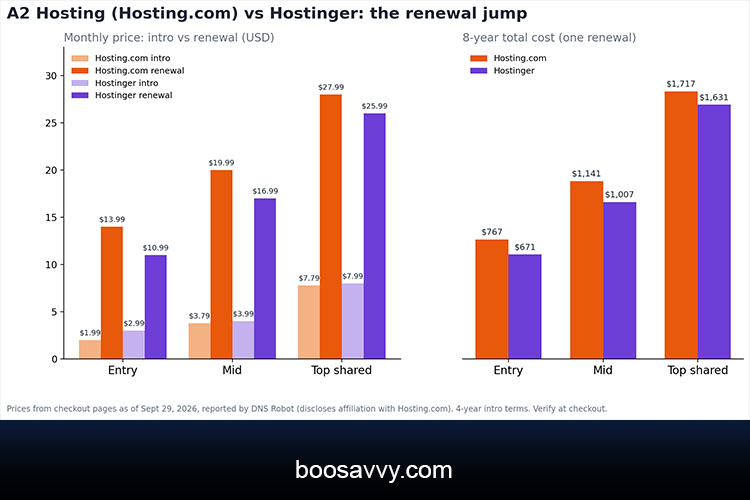
The A2 Hosting Hostinger pricing is actually in Hosting.com’s favour. On a 4 year term the Starter plan is $1.99/month ($95.49) versus Hostinger’s Premium at $2.99/month ($143.52). The same applies at the mid and top shared levels though the gap is very small.
| Entry | Starter $1.99/mo ($95.49) | Premium $2.99/mo ($143.52) | $13.99/mo | $10.99/mo |
| Mid | Pro $3.79/mo ($181.93) | Unlimited $3.99/mo ($191.52) | $19.99/mo | $16.99/mo |
| Top shared | Max $7.79/mo ($373.90) | Cloud Startup $7.99/mo ($383.52) | $27.99/mo | $25.99/mo |
Shorter Terms
If you don’t want the four year commitment then the Hosting.com Starter plan is $2.99 a month on a one year term ($35.88) which is the cheapest way to try either host.
A Note on These Figures
DNS Robot took the prices above from the pricing pages of both companies on 29th September 2026. The site author makes it clear that they work at Hosting.com. Other reviewers have different renewal figures (e.g. Hostinger at $7.99 to $11.99 a month) so be sure to check the current prices at checkout prior to purchasing.
Renewal Rates: Where the Hidden Costs Begin
How Steep Are the Jumps?
Both hosts discount only the first term. Entry level: Hosting.com goes from $1.99 to $13.99 a month (that’s about a 7 fold increase) Hostinger from $2.99 to $10.99 (about a 3.7 fold increase). Mid level: 5.3x and 4.3x respectively. Top shared level: 3.6x and 3.3x.
The lesson is the intro price is the absolute lowest and it hides the massive renewal shock. One user did the maths and found a 566% increase for A2 Hosting (vs 167% for Hostinger) using the older plan prices.
Eight-Year Totals
Over an 8 year period (assuming one renewal at today’s regular prices) Hostinger wins. The entry level plans are $767.01 on Hosting.com v $671.04 on Hostinger (a difference of around $96). At the mid level the difference is around $134 and at the top shared level it’s around $86. If you’re not quite sure the site will still be around in 4 years then Hosting.com is the cheaper option. If you’re going to keep it for 8 years or more then Hostinger’s lower renewals will win.
Hidden Costs Beyond the Renewal Price
Hosting.com have 5 mailboxes on their Starter plan and 20 on Pro. Hostinger give you 2 mailboxes per site on Premium (free for the first year only) so you’ll need to budget for paid email thereafter.
Backups
Hosting.com do daily backups for all their plans for 30 days. Hostinger’s Premium plan is only on weekly backups, daily backups only come with the Unlimited plan. If you’re updating your site quite a bit then a weekly backup could mean you lose days of work.
CDN and Performance Add-Ons
Hostinger do have a CDN on their shared plans. Hosting.com don’t on their shared plans (though their managed WordPress plans do have Cloudflare Enterprise). A CDN is most important for visitors who are a long way from your server.
Domains and Auto-Renewal
Both hosts offer a free domain for the first year, after which it renews at the normal domain rate. Auto-renewal is a definite possibility so you should set a calendar reminder and check the renewal price a month in advance.
Hostinger vs A2 Hosting Speed: What Tests Show
TTFB and Page Load
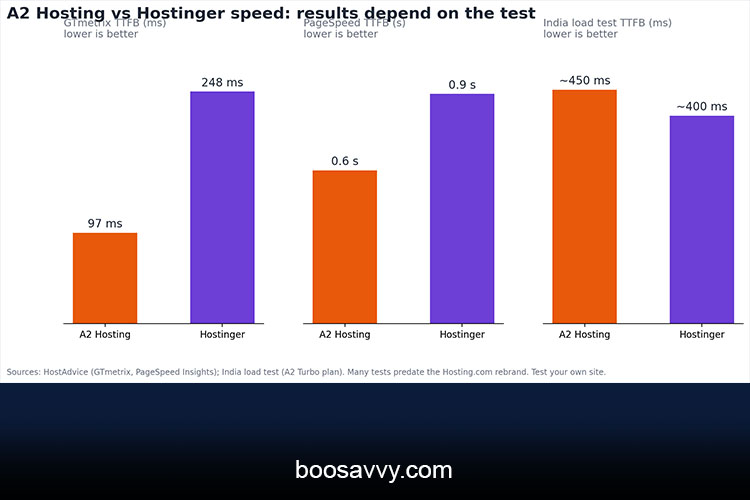
For Hostinger versus A2 Hosting in terms of speed, the results are going to vary depending on who did the testing and where they did it. In HostAdvice’s tests A2 Hosting came out on top with 90% on GTmetrix and a 97ms time to first byte, Hostinger was at 82% with a 248ms TTFB. On PageSpeed Insights the order was reversed for the overall score (Hostinger 90%, A2 88%) though A2’s TTFB was still the better of the two at 0.6s versus 0.9s.
Other tests tell a very different story. Cybernews found Hostinger at 207ms TTFB and 936ms page speed, and a June 2026 benchmark showed 180ms from a US East location. In an India load test A2 Hosting Turbo came in at around 450ms, Hostinger at 400ms and Hosting.com at 597ms.
Uptime
Both hosts have a 99.9% uptime guarantee. Website Planet tested both of them using UptimeRobot and found perfect uptime for each. Other reviewers have also described both as being very reliable.
| GTmetrix TTFB (HostAdvice) | 97 ms | 248 ms |
| GTmetrix performance score | 90% | 82% |
| PageSpeed TTFB | 0.6 s | 0.9 s |
| PageSpeed performance score | 88% | 90% |
| India load test TTFB | ~450 ms (A2 Turbo) | ~400 ms |
| Uptime guarantee | 99.9% | 99.9% |
Many of these tests predate the Hosting.com rebrand so they should be treated as directional. Run your own test during the refund window.
A2 Hosting vs Hostinger for WordPress
Setup and Caching
For A2 Hosting versus Hostinger for WordPress both support one click installs and run on LiteSpeed based stacks. A2 Hosting have long promoted their own custom WordPress optimisation stack (LiteSpeed Cache) and Hosting.com add SSH, Git, WP-CLI and PostgreSQL to every plan. Hostinger are all about their AI website builder with 5 AI credits on the Premium plan and 15 on the Unlimited plan.
Managed WordPress and Growth
Hosting.com’s managed WordPress plans come with Cloudflare Enterprise as part of the package, which is useful for higher traffic sites. Hostinger’s mid-tier plan gives you unlimited websites which is obviously ideal for people who are going to be building a number of small WordPress sites. Neither of these is a premium managed host so you’ll be expected to do a bit of the tuning yourself.
Features and Resource Limits
Sites and Storage
Hosting.com Starter is five sites with 15GB of NVMe storage, Pro is ten sites with 50GB. Hostinger Premium is three sites with 20GB of SSD, Unlimited is unlimited sites with 50GB of NVMe. Hostinger wins on site count at the mid tier. Hosting.com wins on sites at the entry level.
Resource Caps
Hosting.com do publish their hard limits – Starter is 2vCPU / 2GB, Pro is 4vCPU / 4GB and Max is 4vCPU / 8GB. All of their “unlimited” plans on any budget host are still shared resources so you can still get slowed down by a traffic spike on either.
Customer Support: Where Each Falls Short
Hosting.com Support
Hosting.com has 24/7 live chat, tickets, an AI assistant and phone support and claims an average first response time of circa two minutes (this is self reported so take it as a claim). Some of the older reviews also rated A2’s support as being below the best in the industry.
Hostinger Support
Hostinger have 24/7 live chat and an AI assistant, but their contact page has no phone number. If you’re looking to actually talk to a person during an outage that’s a real flaw and some of the forum users do rate their support as pretty poor when it comes to more complex issues.
Control Panel and Ease of Use
hPanel vs cPanel
Hostinger use their own clean hPanel on every plan. Hosting.com offer each plan in two versions at the same price point: their own panel or classic cPanel. If you’re moving from another cPanel host then that familiarity is a big plus. One review described A2’s control panel as a little dated in comparison, Hostinger’s on the other hand is frequently cited as being very simple and easy for the novice.
Downsides at a Glance
A2 Hosting (Hosting.com) Downsides
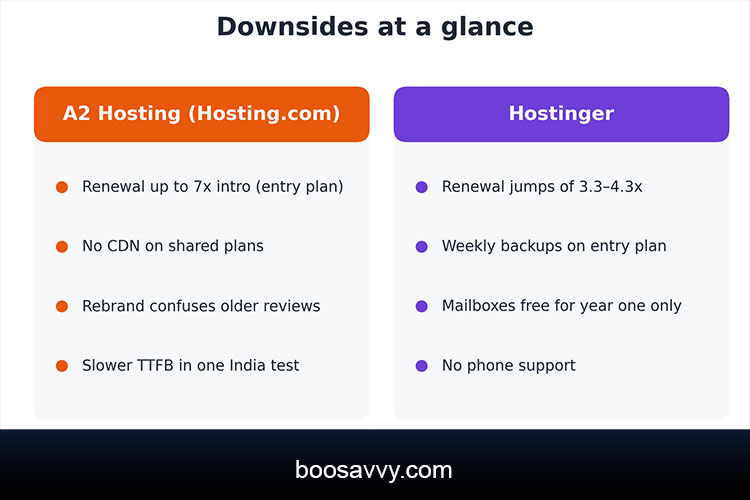
- Renewal prices up to seven times the intro rate on the entry plan
- No CDN on shared plans
- A rebrand that makes older reviews and plan names confusing
- Slower TTFB than Hostinger in at least one India test
Hostinger Downsides
- Renewal jumps of roughly 3.3 to 4.3 times the intro rate
- Weekly backups on the entry plan
- Mailboxes free for only the first year
- No phone support
Which host should you choose?
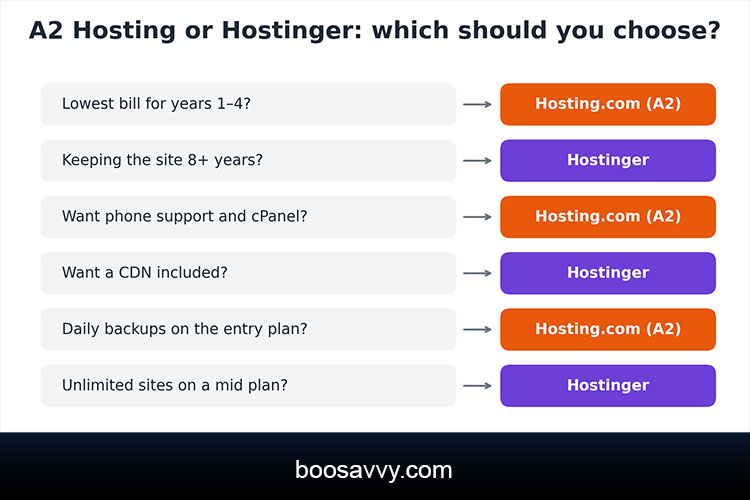
Choose Hosting.com (A2) If You
- Want the lowest cost for the first one to four years
- Value phone support, cPanel and daily backups
- Need included mailboxes on the cheapest plan
Choose Hostinger If You
- Plan to keep your site eight years or more
- Want a CDN and unlimited sites on a mid-priced plan
- Prefer a simple dashboard and an AI website builder
Conclusion
The A2 Hosting vs Hostinger decision comes down to timing and support. Hosting.com (the successor to A2 Hosting) is cheaper up front and you get phone support as well as more entry level features. Hostinger has lower renewals and an included CDN so it’s the better deal over the long term. Neither of them is going to be cheap forever so you need to look at the total cost over the actual period that you’re going to be keeping the site. Check the renewal price before you click buy and use the 30 day money back period to test the speed and the support for yourself.
FAQs
Is A2 Hosting better than Hostinger?
A2 Hosting, now Hosting.com, is cheaper for the first few years and includes phone support, daily backups and mailboxes. Hostinger renews for less and includes a CDN. Which is better depends on how long you keep the site.
Is A2 Hosting the same as Hosting.com?
Yes. A2 Hosting was acquired by World Host Group in January 2025 and rebranded as Hosting.com in April 2025.
Which is cheaper, A2 Hosting or Hostinger?
Hosting.com is cheaper for the first term, while Hostinger is cheaper at renewal and over eight years.
Which is faster, A2 Hosting or Hostinger?
Tests disagree. Some show A2 with a lower TTFB, while others favour Hostinger, so test your own site during the refund window.
Is A2 Hosting or Hostinger better for WordPress?
Both handle WordPress well with one-click installs and LiteSpeed-based caching. Hosting.com adds developer tools, and Hostinger offers unlimited sites on its mid plan.
Does Hostinger have phone support?
No. Its contact page lists 24/7 live chat and an AI assistant but no phone number.
Do both include a free domain?
Yes, for the first year. It then renews at the normal domain price.
Do both have a money-back guarantee?
Yes. Both offer a 30-day money-back guarantee on shared hosting.
What are the highest hidden costs?
Renewal price jumps, email after the first year on Hostinger, and add-ons like extra backups or CDN where they aren’t included.
Can I switch between the two later?
Yes. Both support WordPress migrations, and the money-back window lets you test a move before committing to a long term.