
Choosing a web host is one of the first major decisions you make when setting up a new website and the Bluehost vs Hostinger comparison is probably the one that comes up most often from the novice. Both are very affordable, both are big promoters of WordPress and both have very attractive introductory prices. The actual differences become apparent once that introductory deal is up. This guide looks at the features, pricing, speed, uptime, support and ease of use to help you make your decision.
Bluehost vs Hostinger at a Glance
Both of them are targeting the same customer base: the person who wants a WordPress site online without having to manage a server. Bluehost is the established name (they’re backed by WordPress.org), and they have 24/7 phone support. Hostinger is the value proposition, with some of the lowest entry prices in the business, a bespoke control panel and servers in a number of locations.
In one line: Hostinger is all about price and having the latest infrastructure, Bluehost is all about familiarity, phone support and their WordPress tooling.
Hostinger vs Bluehost Features
On paper the Hostinger vs Bluehost feature lists are pretty much identical: free SSL, one click WordPress install, email and an AI powered website builder. The differences are in the detail.
Storage and limits: Hostinger’s entry plan generally provides more storage than Bluehost’s 10GB starter plan and their Business plan (c.200GB NVMe) is a world away from Bluehost’s Choice Plus (c.40GB SSD).
Hosting types: Hostinger have cloud hosting, no dedicated servers. Bluehost have dedicated servers, no cloud hosting.
Integrations: Bluehost integrates nicely with Shopify and Constant Contact, Hostinger has API and Zapier integrations for custom workflows.
Consistency: Bluehost’s features are pretty consistent across the different plans whereas Hostinger’s vary quite a bit from plan to plan.
| Control panel | hPanel (custom) | cPanel / My Sites |
| Entry-level storage | Higher | 10 GB NVMe |
| Cloud hosting | Yes | No |
| Dedicated hosting | No | Yes |
| Phone support | No | Yes (24/7) |
| Uptime guarantee | 99.9% | None advertised |
| Daily backups | Included at plan level | Often a paid add-on |
Plan details are in a state of constant flux so it’s always worth checking them out on the individual provider’s website prior to purchasing.
Bluehost Hostinger Pricing Comparison
Here’s the Bluehost/Hostinger pricing comparison in plain speak. During the promotion Hostinger is cheaper on all of its plans with the entry level rates generally in the $2.69 to $3.99 per month range on the long term. Bluehost’s starting price is in a very similar bracket and its promotional period is considerably shorter at 36 months as opposed to Hostinger’s 50.
| Typical intro price | About 2.69–3.99/mo | About $3.99/mo |
| Longest promo term | Around 50 months | Around 36 months |
| Renewal | Often 2x or more (Premium near $10.99/mo) | Roughly 2.5x the intro price |
| Daily backups | Included | Roughly $36–48/year extra |
| Five-year cost, no add-ons | Near tie (about $36 apart) | Near tie, marginally lower |
Prices will vary by region, term and promotion. These are indicative only and should not be treated as a quote.
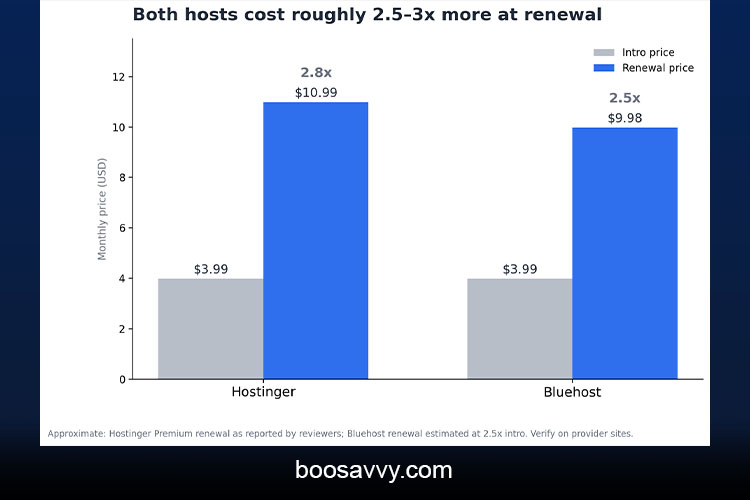
The low sticker price vanishes pretty quickly actually. What determines your real cost is the renewal rates, not the initial rates.
Renewal Rates and Hidden Costs
The sticker price is only half the story. One 5 year cost analysis found the two hosts pretty much identical when you factor in renewals (Bluehost being roughly $36 cheaper before you get to the extras). Throw in the daily backups that Bluehost sells as a separate add-on and Hostinger comes out $143 cheaper over that same period.
Watch for these when you check out:
- Upsells: Bluehost’s checkout page is full of extras that the average user won’t need in the slightest (premium SSL, SiteLock, CodeGuard, domain privacy etc).
- Term length: the lowest prices will generally require a 36 to 48 month prepayment.
- Renewal date: Put that in your calendar and check the prices a month in advance. Some reviewers have reported that Hostinger’s renewal price jumps up to 4 or 5 times the initial rate so don’t expect it to be cheap at all.
Bluehost vs Hostinger Speed and Uptime
When it comes to Bluehost vs Hostinger in terms of speed and uptime the independent testing is a bit of a mixed bag.
Uptime: In the Cybernews testing both hosts achieved 100% uptime over the course of several weeks. Bluehost only achieved 91% reachability in that test and Hostinger had a 246ms response time on average. A separate six month monitor saw Bluehost at 99.98% and Hostinger at 99.97% so again effectively a tie.
Speed: HostAdvice’s tests gave Hostinger a 96% GTmetrix score with a 1.3 second speed index and Bluehost 95% with 1.1 seconds. Bluehost was slightly quicker on that metric, Hostinger was faster on full load time.
Under load: With 50 concurrent virtual users Hostinger was stable and Bluehost showed a little strain at the end.
Guarantees and locations: Hostinger have a 99.9% uptime guarantee. Bluehost are very strong in North America. Hostinger have servers in the US, UK, Brazil, the Netherlands, Singapore, Indonesia and Lithuania so that helps out those of us in Europe and Asia.
Real world speed is also going to be very much dictated by your theme, your plugins, your images and your caching. Neither host is going to save you if you’ve got a bloated site.
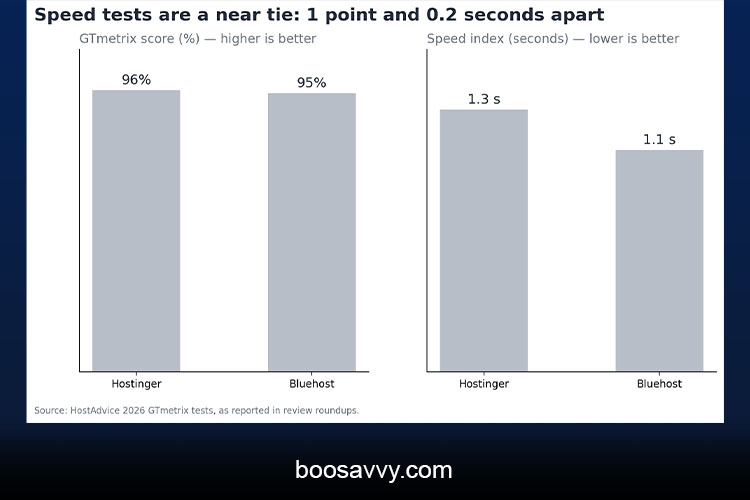
With the scores so close, location, caching and your own site’s weight will be more important than the host.
Ease of Use: hPanel vs cPanel
Hostinger use their own hPanel, Bluehost combine their My Sites interface with the standard cPanel. hPanel is generally seen as cleaner, Bluehost’s as being a bit more cluttered. hPanel is the one that’s ideal for the first time user who just wants a clean, straightforward setup. Bluehost’s is the one that’s ideal for people who are already familiar with cPanel (the skills you gain there are transferable to pretty much any other host you might move to later).
Customer Support
Bluehost’s support is their biggest advantage in my opinion as they offer 24/7 phone support (Hostinger don’t). Both have live chat. There are forum posts from Bluehost users who have had to use a chat ticket to resolve crashes that just wouldn’t recover on their own. There are also forum posts from Hostinger users who have had to wait longer for a resolution on more complex issues as there is no phone line. Quality is very much agent and day dependent so it’s worth testing the live chat yourself before you make a decision.
Security and Backups
Both hosts offer free SSL certificate. The key difference is in the backup provision. Hostinger have daily backup as a feature at the plan level, Bluehost have it as an add-on which you normally have to pay for. Whichever you go for, you should still maintain your own off-site backups using a free WordPress backup plugin. A host’s backup is a safety net, it’s not a substitute for your own.
Which is better, Bluehost or Hostinger, for beginners?
Which is better for the beginner, Bluehost or Hostinger? The vast majority of the 2026 reviews would have you go with Hostinger. It’s cheaper to start with, has a much cleaner dashboard and includes backups. Easy to go live in an afternoon.
Bluehost still is a strong beginner choice if you:
- Want to call a person when something breaks.
- Like the WordPress.org recommendation
- Already know cPanel
- Serve predominantly a North American audience.
What Reddit and Real Users Say
I couldn’t actually pull the verbatim Reddit posts so I’m not quoting them. The reviewers who have read the forums do describe a fairly consistent pattern though. The Bluehost complaints are all about the crashes that required support tickets and the checkout upsells. The Hostinger complaints are all about the slower help with more complex issues. Be very wary of any “winner” claim really. Both of those companies have very profitable affiliate programmes and that could well be biasing this review (if you’re using affiliate links). Before you go and buy, do a search on r/webhosting and r/Wordpress for both of those names and read the recent threads yourself.
Who Should Choose Which?
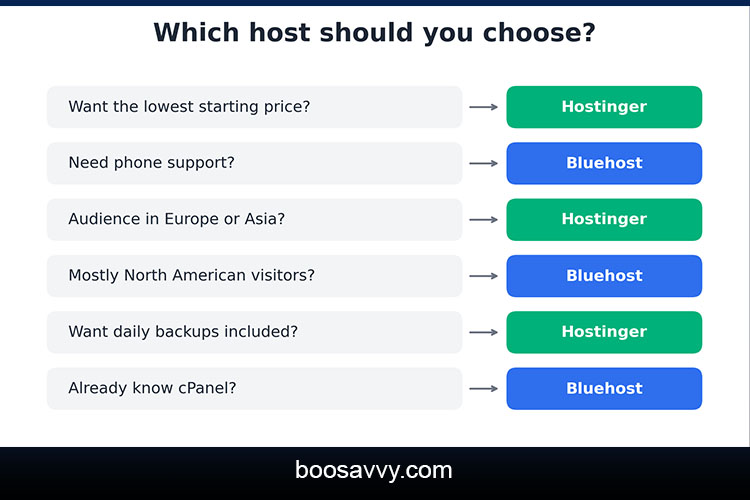
Choose Hostinger if you:
- Want the lowest starting price with backups included?
- Have a global audience (particularly in Europe and Asia).
- Prefer a clean modern dashboard.
- Plan to run a number of small sites.
Choose Bluehost if you:
- Want phone support and a familiar cPanel
- Primarily a North American audience.
- Value the WordPress.org endorsement.
- May need dedicated hosting later
Conclusion
The Bluehost vs Hostinger decision comes down to what you’re after. Hostinger wins for the majority of new users on price, the range of included features, the geographical spread of their servers and the cleaner interface. Bluehost has the counter-argument in that it offers phone support, cPanel and excellent WordPress integration and the performance is so close that speed is rarely the deciding factor. Check the renewal rates and the cost of any add-ons before you commit as the total cost over time is far more important than the first year deal. If you’re not sure then go for a shorter term and test the support and site speed before you lock in for years.
FAQs
- Is Hostinger better than Bluehost?
For the vast majority of the beginners and the budget buyers out there the answer is yes according to the majority of the 2026 reviews. Bluehost wins if phone support is your thing.
- Which is the cheaper of Bluehost or Hostinger?
Hostinger is cheaper during the initial period. The difference closes (or can even reverse) on renewal and add-on pricing depending on the plan.
- Which is faster, Bluehost or Hostinger?
Tests are mixed. Hostinger generally comes out on top in terms of response time and load under stress, Bluehost can do better on some of the metrics (particularly in North America).
- Does Bluehost provide an uptime guarantee?
Reviews state that Bluehost advertises no uptime guarantee at all, Hostinger advertises 99.9%. Always check the current terms before you buy.
- Which has the better customer support?
Bluehost have 24/7 phone support (Hostinger don’t). Both have live chat.
- Can I move my site between the two at a later stage?
Yes. Both support WordPress migration, and cPanel makes moving from Bluehost to many other hosts straightforward.
- Which is better for WordPress?
Both are solid. Bluehost has the official WordPress.org recommendation, while Hostinger offers optimized WordPress plans and cleaner tooling.