
For websites that have exceeded the capabilities of shared hosting or require greater uptime and reliability, cloud hosting is a natural next step. The market is highly competitive, and the term ‘cloud’ encompasses offerings ranging from low-cost virtual servers to comprehensive managed platforms. This guide clarifies the features of cloud hosting and compares leading cloud server hosting options for 2026, enabling readers to select a solution aligned with their budget, technical expertise, and anticipated growth.
Also Read: Bluehost vs Hostinger: which web host is better in 2026?
What is Cloud Server Hosting?
Traditional hosting puts your site on a single physical server. Cloud hosting takes a different approach, with your site being spread across a network of interconnected virtual servers. The advantage of this is that if one server goes down, another can take over. You can also add resources as and when required during a traffic spike without having to move your site.
Key benefits of cloud hosting are improved reliability, scalability and (on many platforms) pay-as-you-go pricing. The downside is that cloud hosting plans are generally more expensive than shared hosting and a small or simple site may not actually benefit from the extra complexity.
Cloud vs Shared vs VPS Hosting
Shared hosting will host multiple sites on a single server and is ideal for blogs and portfolio sites. A VPS will give you dedicated resources on a single server. Cloud hosting uses a pool of servers and provides better resilience to both failure and traffic spikes. Many of the current ‘cloud VPS’ offerings sit in a grey area and it’s important to check whether the plan is actually based on a redundant infrastructure or is simply a rebranded virtual server.
Best Cloud Server Hosting in 2026: Quick Picks
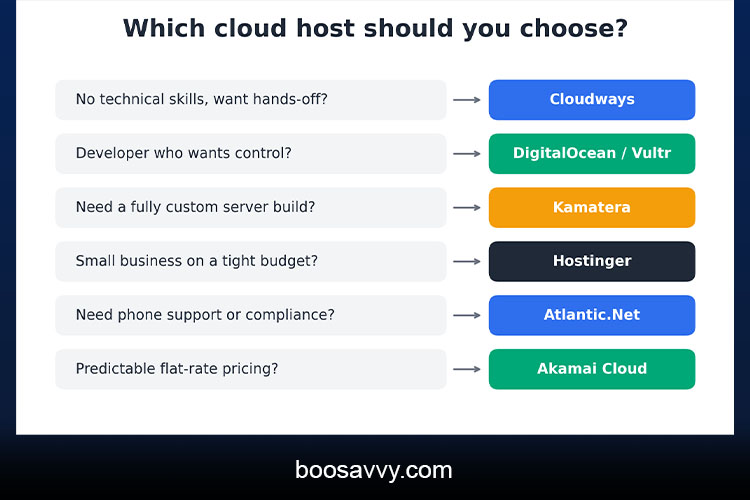
The optimal choice depends on user requirements and expertise:
- Best managed cloud server: Cloudways (takes care of the setup, security and backups on top of the major cloud providers).
- Best for developers: DigitalOcean and Vultr (simple flat pricing, massive global footprints).
- Best value and most flexible: Kamatera (servers from as little as $4 a month).
- Best for the absolute beginner on a budget: Hostinger. Very low entry prices and a pretty straightforward dashboard.
- Best with phone support: Atlantic.Net (they do advertise phone support and have a 100% uptime SLA).
Cloud Hosting Providers Compared
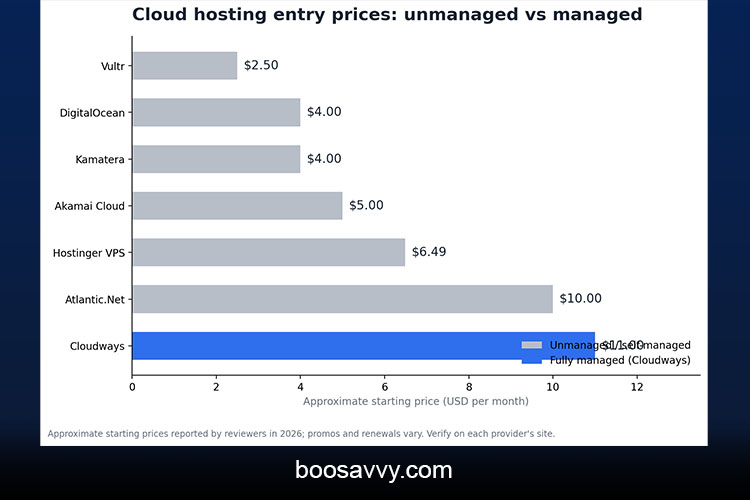
The following table compares the various cloud hosting providers on the basis of entry level pricing and overall value. The prices listed are approximate starting rates as reported by reviewers in 2026 and are subject to change due to promotional pricing; it’s always worth checking the individual provider’s site for current pricing.
| Vultr | From about $2.50/mo | Unmanaged | Developers, global reach |
| DigitalOcean | From $4/mo | Unmanaged | Developers, startups |
| Kamatera | From about $4/mo | Unmanaged (managed add-on) | Custom builds |
| Akamai Cloud (Linode) | From $5/mo | Unmanaged | Predictable shared CPU plans |
| Hostinger VPS | About $6.49/mo intro | Unmanaged | Budget small business |
| Atlantic.Net | About $10/mo | Unmanaged / managed | Compliance, phone support |
| Cloudways | About $11/mo promo | Fully managed | Non-technical site owners |
Cloudways: Best Managed Cloud Server
Cloudways is an intermediary between you and the actual infrastructure. You pick your provider (DigitalOcean, Vultr, Akamai Cloud, AWS, Google Cloud etc), your server size and your location and Cloudways takes care of the setup, the security and the backups. DigitalOcean’s entry level plans are currently around $11/month (normally $14) and there’s a short free trial available.
The catch with it is the add ons (CDN is charged by bandwidth, backups can be an extra on some plans and transactional email is a separate add on). That said it is one of the most popular choices for a managed cloud server with absolutely no sysadmin work at all for WordPress and WooCommerce sites.
DigitalOcean and Vultr: Best for Developers
DigitalOcean’s Droplets are Linux VMs from $4/month (now billed per second) and they have excellent documentation and a massive library of tutorials. Vultr is the closest alternative with a wide range of instance types, 17+ locations and regular compute from $2.50/month.
Both are unmanaged by default so you’re on your own with respect to installing the software, applying updates and securing the server. For the technically minded they’re a massive asset and provide a very solid basis on which to build a scalable cloud hosting solution.
Kamatera and Akamai Cloud: Flexible and Budget-Friendly
Kamatera allows you to configure your servers to exactly the specifications you require, with pricing starting at around $4 per month and a pricing calculator to work out the cost of your own configuration. You can choose between hourly and monthly billing and of course you can add on managed services for an additional cost. Reviewers have noted that the support is very much developer oriented rather than aimed at the novice user.
Akamai Cloud (the rebranded Linode) have just announced CPU plans from as low as $5/month (1GB RAM, 25GB storage). The pricing is very predictable.
Best Cloud Server Hosting for Small Business
Small businesses typically look for value (i.e. good pricing), reliability (i.e. uptime) and responsive support. The ideal cloud server hosting solution for a small business is therefore likely to be very different to the one that a developer would go for.
Hostinger is excellent value. The VPS KVM 1 plan is circa $6.49/month on a 24 month term and renews at around $11.99 so check the renewal price before you go ahead and commit.
SiteGround has been positioned as the answer for the small business that’s too big for shared hosting and too small to warrant a full VPS.
Atlantic.Net is for small businesses that require compliant hosting and have access to live US based phone support. Cloudways’ pricing is ideal for organisations that don’t have in-house technical skills or who just don’t want to be involved in server administration at all. The team want to touch a server.
Managed vs Unmanaged Cloud Servers
Choosing between managed and unmanaged cloud servers is a key decision once you’ve established your budget.
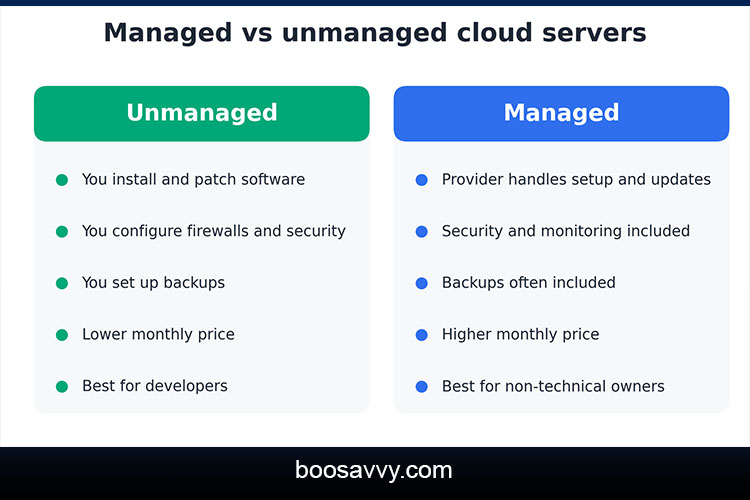
An unmanaged server only provides the infrastructure. You’re on your own for installing the software, patching it, configuring the firewall and doing the backups. It’s the cheaper option and gives you a lot of flexibility, just be aware that if you make a mistake in the management of the server you can end up with downtime or a security issue.
A managed cloud server will have the provider looking after the OS, the security patches, the monitoring and often the backups too. It’s more expensive on a monthly basis but it’s a huge reduction in admin and risk. If you don’t have the in house technical skills then managed hosting is the way to go.
Scalable Cloud Hosting: How Scaling Works
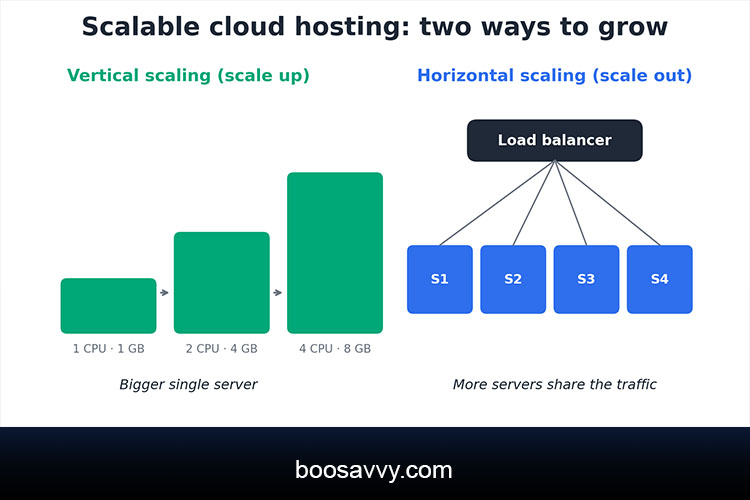
Scaling is generally split into two categories: vertical and horizontal. Vertical scaling is the process of taking a single server and adding more CPU, more RAM and/or more storage to it. This is the approach that’s used by most small sites. Horizontal scaling is the process of adding multiple servers behind a load balancer and is the approach that’s typically used by high traffic stores and applications.
Before you go and pick a provider it’s worth bearing in mind how easy it is to resize, how much downtime you’ll have during an upgrade and what features are available (load balancers, snapshots, auto-scaling etc). Some of the budget plans only allow for fixed scaling increments whereas others (DigitalOcean, Vultr, Kamatera) allow for much finer scaling.
How We Can Choose the Best Cloud Server Hosting
The following checklist should be checked prior to finalising a purchase.
| Do you have technical skills? | If not, choose managed hosting |
| What is your real budget? | Include backups, CDN and support add-ons |
| Where are your visitors? | Pick a data center near them |
| How fast will you grow? | Check scaling options and limits |
| What if it breaks? | Compare support channels and SLA terms |
| Do you handle sensitive data? | Look for compliance options |
It’s also important to bear the uptime guarantee in mind. A 99.9% SLA allows for up to 9 hours of downtime per year whereas a 99.99% SLA allows for less than an hour. That difference is huge for a site that’s mission critical.
Cloud pricing structures can be complex.
Watch for:
- Intro versus renewal rates: you can have promotional prices at renewal which go up by 50% or so.
- Add-on costs: backups, CDN, email, managed databases and additional bandwidth are all usually extra.
- Billing models: you can have either an hourly or a per-second billing model (which is very flexible) but that can catch you out if you’ve got resources running.
- Free trial limits: short trials may not be long enough to properly test the performance and support services. It is definitely worth starting with a monthly plan and properly testing the performance and support services before you commit to a long term contract. Speed and support.
Conclusion
The best cloud server hosting solution is going to be one that suits your own level of technical know-how and the needs of your organisation. Cloudways is the one to go to if you’re looking for a fully managed cloud server and don’t want to get your hands dirty with server administration at all. DigitalOcean and Vultr are the ones that developers will typically go for as they offer the control they want and are very cost effective. Hostinger and Atlantic.Net are the ones that will appeal to small businesses who are looking for a low entry cost or who need a lot of phone support. Whatever solution you go with you do need to check the renewal terms, check the cost of any add-ons and check the support prior to committing. It’s vital to do a proper comparison of the options at the outset to avoid any problems down the track.
FAQs
What is the best cloud server hosting overall?
There’s no clear cut answer. Cloudways is probably the most well managed of the options. DigitalOcean and Vultr are clearly the better choices for developers. Hostinger is probably the best value for a small business.
What’s the difference between cloud hosting and VPS hosting?
A VPS is a virtual slice of a physical server. Cloud hosting runs across a network of servers, providing greater redundancy and scalability.
Is cloud hosting good for small businesses?
Yes, if you need reliability and the ability to grow. Simple little sites could quite happily be on shared hosting.
What’s the cost of cloud server hosting?
Unmanaged servers start at circa $2.50 to $6 a month and managed platforms such as Cloudways start at circa $11 to $14. Prices go up as you require more resources and more add ons.
What is a managed cloud server?
A managed cloud server is one where the provider does the setup, the updates, the security and the backups for you.
Which cloud hosting providers are best for the complete beginner?
Cloudways and Hostinger are typically easier for the non-technical user than the unmanaged providers such as DigitalOcean and Vultr.
What does scalable cloud hosting mean?
It means you can scale up or scale down your server resources as your traffic changes (either by upgrading one server or by adding more).
Is cloud hosting any more secure than shared hosting?
It can (given the isolation of the resources) but it’s still dependent on updates, firewalls and configuration (particularly on the unmanaged servers).
Can I migrate my site to a cloud server?
Yes. A lot of the providers will have migration tools or migration assistance and managed hosts such as Cloudways will generally have migration support as part of their offering.
Do I need any technical skills in order to use cloud hosting?
For unmanaged servers, yes. With managed hosting, you need very little technical knowledge.