WordPress powers a massive proportion of the web and your host is going to have a huge impact on how fast, how secure and how stable your site feels. “Best” is of course going to be very much down to who you are. Are you a first-time blogger? A WooCommerce store owner? An agency running 20 or 30 client sites? This guide looks at seven solid WordPress hosting providers, explains the differences between them and tells you which is the best hosting company for WordPress for your circumstances.
Also Read: Bluehost vs Squarespace: The Pros, Cons and Hidden Costs Compared
What makes the best hosting company for WordPress?
The Criteria That Matter
A good WordPress host does five things well: it loads pages quickly, it stays up, it protects your site, it helps you when things go wrong and it prices fairly. Most people will only look at the first year price, but the renewal rate and the traffic limits are just as important.
Why “Best” Is Personal
A host that’s perfect for a hobby blog could be a very poor choice for a store. There’s a general consensus among reviewers that there is no single ‘best’ host out there, just different hosts that are best suited to different use cases. That’s why this list has grouped the hosts by the type of site they’re best suited to serve.
Managed WordPress Hosting vs Shared Hosting
Shared WordPress Hosting
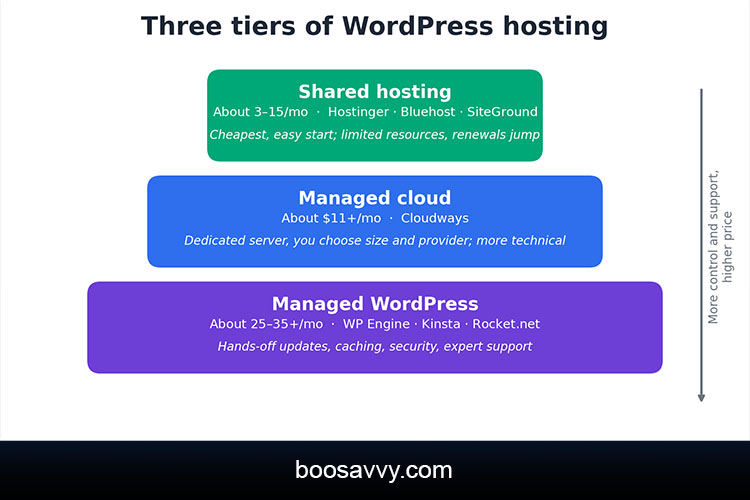
Shared plans see a large number of sites on a single server. They’re the most economical option and are ideal for new blogs and small business sites. The downside is that the resources are quite limited and prices on renewal can go up significantly.
Managed WordPress Hosting
Managed WordPress hosting is where the hosting provider takes on the WordPress-specific stuff for you (automatic updates, caching, backups, security monitoring, etc.) and provides expert support. Although it costs more, it saves considerable time and minimizes potential risks.
Managed Cloud Hosting
Cloud based options such as Cloudways give you a dedicated virtual server that the provider takes care of. They scale very easily and the billing is transparent, they do require a bit more technical comfort.
WordPress Hosting Providers at a Glance
This table sets out the seven picks. The prices are approximate 2026 starting prices based on the reviews and are subject to change so always check the individual provider’s site for the most up to date pricing.
| Hostinger | About $2.99/mo (renews about $11.99) | Shared | Budget launches |
| Bluehost | About $3.99/mo (renews about $9.99) | Shared | Beginners |
| SiteGround | About $2.99/mo (renews about $17.99) | Shared | Support and features |
| Cloudways | From about $11/mo | Managed cloud | Growing sites, flexibility |
| WP Engine | About $25–$30/mo | Managed WordPress | Agencies, business sites |
| Kinsta | About $30–$35/mo | Managed WordPress | Premium performance |
| Rocket.net | About $25–$35/mo | Managed WordPress | Speed, WooCommerce |
The 7 Best WordPress Hosting Providers
1. Hostinger: Best Budget Option
Hostinger have one of the lowest entry prices (around $2.99/month) and one of our 2026 tests recorded a very good 180ms time to first byte from a US East data centre, which is quite good for a shared host. The hPanel is very easy to use for the novice. The negatives are the renewal price jumps up to about $11.99, no phone support and weekly backups on the entry plan.
2. Bluehost: Best for Beginners
Bluehost is officially recommended by WordPress.org and provides both chat and phone support. The starter plan is around $3.99/month on a 36 month term and renews at just under $9.99. The checkout page will have the various add-ons (backups, scanning, domain privacy etc.) which one source has estimated could add $5 to $10/month so be very careful to read each box before you commit to the purchase.
3. SiteGround: Best for Support and Features
SiteGround is on Google Cloud and is highly commended for its fast, WordPress-savvy support (phone, chat and tickets). The StartUp plan is priced at just under $3/month but renews at around $17.99 (so about six times more). That’s the kind of plan you’d take if you were after support and performance tools rather than the absolute cheapest long term price.
4. Cloudways: Best Flexible Managed Cloud
Cloudways lets you select your cloud provider (DigitalOcean, Vultr, Akamai Cloud, AWS or Google Cloud), your server size and location, starting at $11/month with no renewal increase. It’s a very solid managed cloud option for a growing site. The downside is there’s no phone support, only a 3-day trial (rather than a long refund period), and things like email and Cloudflare Enterprise (listed at around $4.99) are billed separately.
5. WP Engine: Best for Agencies and Business Sites
WP Engine is a premium WordPress only host with entry level plans at around $25-$30 a month, a 60 day money back window and good developer tooling. One test produced a 180ms TTFB from US East. Visit caps can of course drive the price up and phone support is only available on the higher tiers according to the reviewers.
6. Kinsta: Best Premium Managed WordPress Hosting
Kinsta runs on Google Cloud’s premium network, includes application performance monitoring and has no renewal surprises. The entry plan is $35/month or $30/year. It’s been described as one of the very best overall managed hosts (though the time to first byte varies considerably from test to test, ranging from around 140ms to over 500ms) so you’ll need to test your own site.
7. Rocket.net: Best for Speed and WooCommerce
Rocket.net bundle Cloudflare Enterprise on all plans and push full page caching across their edge network. One example recorded a 110ms TTFB from US East and another around 380ms. Plans are in the region of $25-$35 a month with visit and storage limits to be aware of. It’s a very popular choice with WooCommerce stores and agencies.
Pricing and Renewal Rates Compared
The Renewal Trap
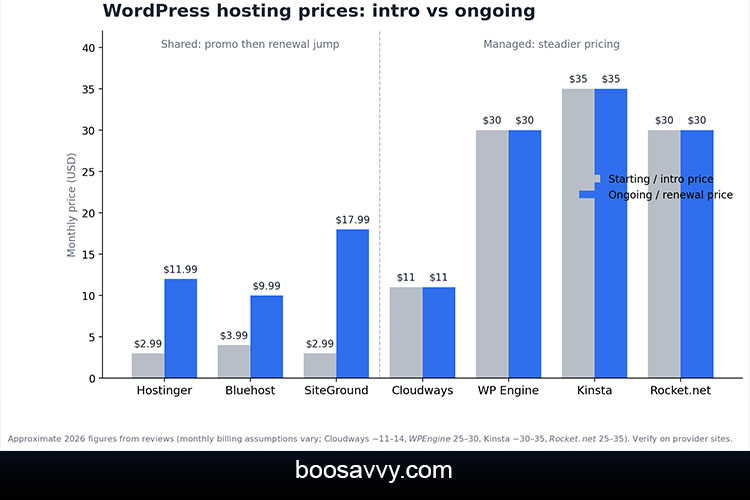
Shared hosts discount the first term and then go up at renewal. SiteGround’s increase is the biggest of the three shared hosts on this list, Bluehost’s is the more modest of the two. The managed hosts (Cloudways, WP Engine and Kinsta) all charge a consistent price from the outset so their advertised price is much closer to what you’ll actually end up paying.
Hidden Costs to Watch
Beyond the renewals, budget for the add-ons (backups, security scanning, email), visit the overages on your managed plans, extra sites and domain renewals after the first year free.
Speed and Performance
What Tests Show
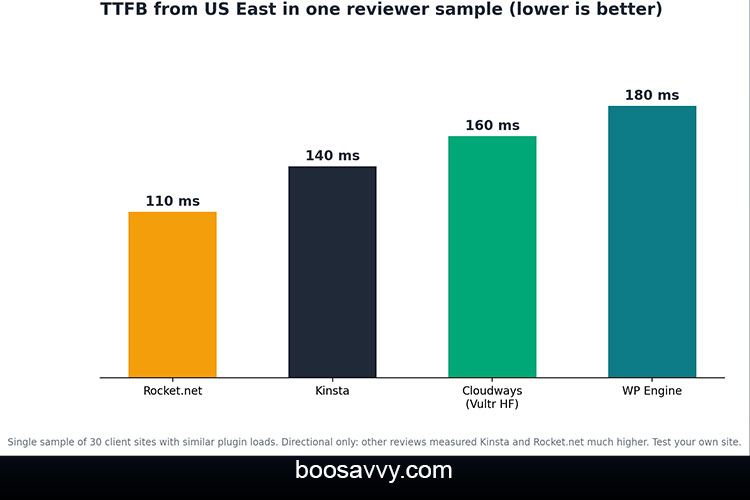
Speed claims are all over the place so take any one number with a pinch of salt. One sample of client sites from US East gave Rocket.net at 110ms TTFB, Kinsta at 140ms, Cloudways on Vultr High Frequency at 160ms and WP Engine at 180ms. Another test gave Hostinger at 180ms.
| Rocket.net | 110 ms |
| Kinsta | 140 ms |
| Cloudways (Vultr HF) | 160 ms |
| WP Engine | 180 ms |
These figures are from one reviewer’s sample so are directional. Other reviews have measured Kinsta and Rocket.net at considerably higher TTFB (depending on the datacentre and the site being tested).
Why Your Own Test Matters
Speed is down to your theme, your plugins, your images and your visitor’s location. Use the trial or money back period on each host to test a copy of your own site rather than just go by the benchmark charts.
Support and Security
Support
SiteGround, Bluehost and WP Engine all provide some form of phone support which is obviously a big plus if you’re experiencing an outage. Hostinger and Cloudways are strictly on chat and tickets. Kinsta as a premium host is very highly regarded for the level of knowledge and expertise of their support team (specifically in the WordPress space).
Security and Backups
All seven include SSL and basic protection. The backups vary with some including daily backups as standard, others charging extra or offering weekly backups on the entry plans. Whatever host you go with, you’ll need to have your own offsite backup.
How to Choose the Best WordPress Hosting for You
Five Questions to Ask
How much traffic do you expect? What’s your actual 3 year budget (including renewals and add-ons)? How comfortable are you with the technical side? Do you need phone support? Where are your visitors based? Your answers will rapidly eliminate a lot of the options: low traffic and a tight budget point you straight to Hostinger or Bluehost, whereas a revenue critical site will be pointing you at a managed host.
Test Before You Commit
Use money back windows and trials to test out the speed, the level of support response and the dashboard before you commit to a long term.
Best WordPress Hosting by Use Case
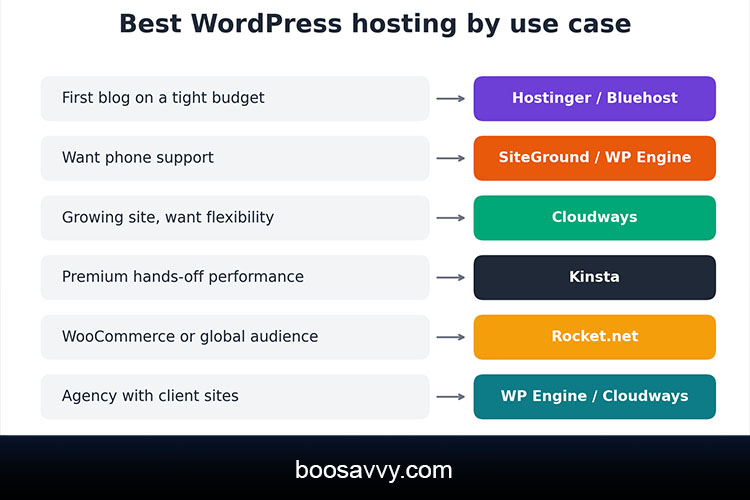
- First blog on a tight budget: Hostinger or Bluehost
- Want human support on the phone: SiteGround or WP Engine.
- Growing site that needs flexibility: Cloudways
- Premium hands-off performance: Kinsta
- WooCommerce or global audience: Rocket.net
- Agency managing client sites: WP Engine or Cloudways
Conclusion
The best WordPress hosting company for you is going to be the one that fits your budget, your skillset and your growth plans. Hostinger and Bluehost are great for getting started affordably. SiteGround has excellent support.
Cloudways is ideal if you’re going to be growing your site. For businesses where speed and uptime are a revenue stream then WP Engine, Kinsta and Rocket.net are the way to go. Always compare the three year cost rather than the first year price, always read the renewal terms and absolutely do your own site during the trial/refund period. A few hours of comparison now will save you months of headache later.
FAQs
1. What is the best hosting company for WordPress?
There is no single winner. Hostinger and Bluehost suit budgets, SiteGround suits support, Cloudways suits flexibility, and Kinsta, WP Engine and Rocket.net suit premium needs.
2. What is managed WordPress hosting?
It is hosting where the provider handles WordPress updates, caching, backups, security and expert support so you can focus on your content.
3. Is managed WordPress hosting worth the extra cost?
For business sites, stores and agencies, it usually is, because it saves time and reduces risk. For small blogs, good shared hosting is often enough.
4. Which is the best WordPress hosting for beginners?
Bluehost and Hostinger are popular beginner choices thanks to easy setup and low starting prices.
5. Which WordPress host is the fastest?
Rocket.net, Kinsta and WP Engine often test well, but results vary by test, data centre, and site, so run your own speed test.
6. Are WordPress.org recommended hosts really better?
Recommendations such as Bluehost’s and DreamHost’s are a useful signal, but they don’t guarantee the best speed or value for your site.
7. How much should I pay for WordPress hosting?
Shared plans start around $3 a month, while managed WordPress plans typically start around $25 to $35 a month. Always compare renewal prices.
8. Do I need phone support?
Not always, but it helps during outages. SiteGround, Bluehost and WP Engine offer it in some form, while Cloudways and Hostinger rely on chat and tickets.
9. Can I switch WordPress hosts later?
Yes. Most hosts offer migration plugins or help, and WordPress sites are portable, so you can move if your needs change.
10. How do I choose between shared, managed and cloud hosting?
Choose shared hosting for low-traffic sites on a budget, managed WordPress hosting for business-critical sites, and managed cloud hosting when you want scalable, flexible resources.