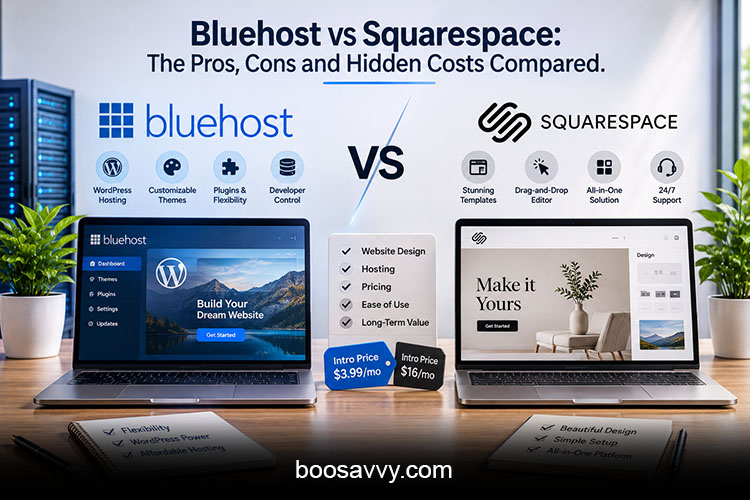
Comparing Bluehost and Squarespace is a bit like comparing a toolbox to a finished room. One gives you the components and the freedom to build whatever you like. The other gives you a room that’s already built and ready to move into. This Bluehost vs Squarespace guide looks at the pros and cons of each and the hidden costs so you know what you’re actually going to pay for and what you’re actually going to get before you make your decision.
Also Read: Cloudways vs SiteGround: The Surprising Differences You Need to Know
Bluehost vs Squarespace at a Glance
The Short Version
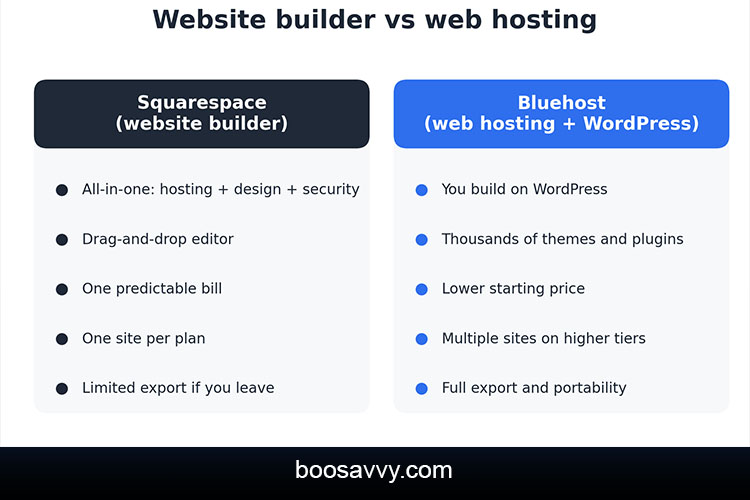
Squarespace is an all in one website builder, essentially a package deal which includes hosting, templates, a visual editor and all the tools you need to build a site in one subscription. Bluehost is a web host (they’re best known as a WordPress host) so you build your site on WordPress and then pay Bluehost to host it.
Who Each Platform Suits
Squarespace is ideal for creatives, portfolios and small businesses that just want a beautiful site quickly. Bluehost is for those who want control, lower entry costs and the flexibility of WordPress (even if that does mean a bit of a learning curve).
Website Builder vs Web Hosting: The Core Difference
What “Website Builder” Means
A website builder gives you it all in one package: design tools, hosting, security and support. You pay one price and the platform deals with the updates for you. The downside is you have far less control over how the site actually works.
What “Web Hosting” Means
Web hosting is you renting space on a server and you pick the software that runs on it. With Bluehost that’s normally going to be WordPress. You get the freedom, you get thousands of themes and plugins and you can move your site wherever you like, but you also take on a lot of the setup and the maintenance.
Understanding the website builder v web hosting split is the key to the rest of the comparison as pretty much all the differences in price, flexibility and effort are a direct result of it.
Squarespace or Bluehost? Ease of Use
Squarespace: Drag-and-Drop Simplicity
Squarespace is pretty much universally regarded as one of the easiest website builders. The visual editor is very straightforward, has grid lines and clean templates and you can have a site live in a weekend. One reviewer described it as the easiest website builder on the market today.
Bluehost: More Steps, More Options
Bluehost don’t give you a builder by default. You install WordPress, pick a theme and then start adding plugins which takes a lot longer to learn. You can get away with it as a beginner, but you’re going to be looking at a weekend or more to really get to grips with it.
Bluehost Website Builder: What WonderSuite Offers
How It Works
Bluehost’s answer to Squarespace is WonderSuite which is a WordPress based setup experience that walks you through the process of building a site without any coding. The Bluehost website builder is essentially a very friendly layer on top of WordPress rather than a separate product. It also comes with AI tools to help you get your first draft of the site done much quicker.
Where It Falls Short
As it’s built on WordPress you’re still dealing with plugins, updates and a much heavier dashboard than Squarespace. The reviewers who have compared the two have noted that it does a very good job of emulating the Squarespace experience, just isn’t as slick or as well integrated.
Design and Templates
Squarespace is renowned for its award winning templates which look absolutely professional with very little effort on your part, which is why photographers, designers and restaurants all love it. The caveat is of course that you’re working within Squarespace’s structure and you can only customise so much.
WordPress on Bluehost has a much wider range of themes and page builders available. You can build pretty much any layout you like, the downside being that the quality is all over the place and some of the premium themes and plugins will cost you extra.
Bluehost vs Squarespace Pricing Comparison
Squarespace Plans
Squarespace pricing is flat and all in. Their site plans are priced at approximately $19 (Basic), $29 (Core), $49 (Plus) and $99 (Advanced) per month with discounts of the order of 15-20% for the annual payment option in a number of cases. One report suggests that Squarespace increased their plan prices by as much as 26% in July 2026 so be sure to check the current figures.
Bluehost Plans
Bluehost have WordPress shared hosting on their site from around $3.99/month on a 36 month term (Starter), $6.99 (Business) and $14.99 (Premium). The Starter plan renews at around $9.99, Business at $13.99 and Premium at $21.99.
| Entry price | About $16–$19/mo | About $3.99/mo (36-month term) |
| Renewal | No separate renewal jump listed | About $9.99/mo (Starter) |
| What’s included | Hosting, templates, builder, SSL | Hosting, free domain year one, SSL, WordPress install |
| Sites per plan | One | Multiple on higher tiers |
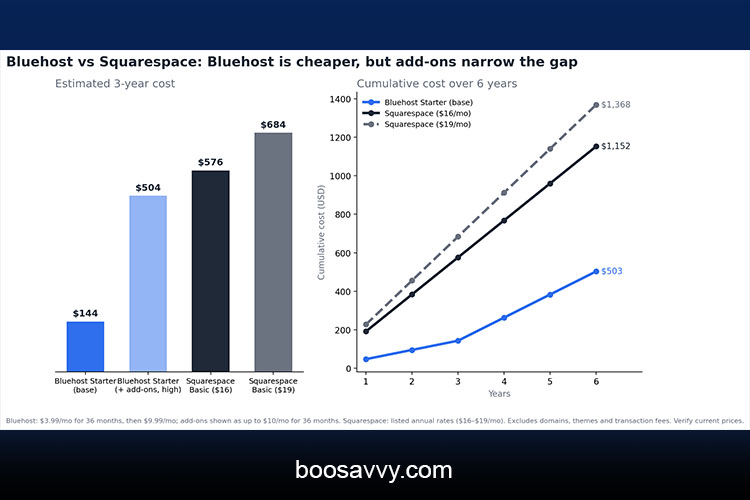
| Roughly 3-year cost | About $576–$684 (Basic) | About $144 (Starter, base) |
Prices will vary by plan, term and promotion so be sure to check current rates before you buy.
The Hidden Costs of Each Platform
Bluehost: Renewals and Add-Ons
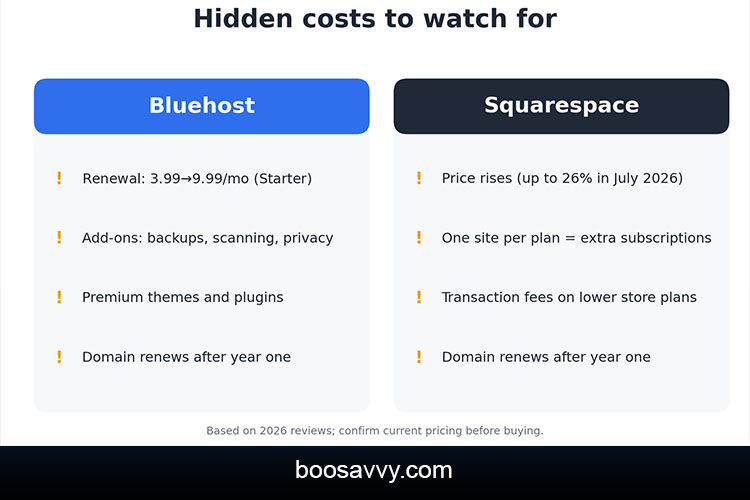
Bluehost’s low price has its drawbacks. Three years of Starter at $3.99 works out at about $144 but the next three years at $9.99 is $360 for the same site. Checkout also pushes the add-ons (CodeGuard backups, SiteLock scanning, domain privacy, premium SSL) which one source says can add $5-$10 a month if you take them all. Premium themes and plugins can add further to that.
Squarespace: Price Rises and Fees
Squarespace costs are easier to forecast (though by no means hidden free). The prices have gone up, one site per plan means that every additional project will require its own subscription and the lower tier commerce plans do come with transaction fees which the higher tier plans eliminate. After the first year, domains renew at regular prices, while additional features like email services and scheduling tools come at a higher cost.
The Real Cost Question
The straight answer is that Bluehost is generally cheaper on the sheet, even once you’ve factored in the add-ons, but you pay in time and in the learning curve. Squarespace is more expensive month on month but it bundles in all the features that you’d otherwise have to put together yourself.
Speed and Performance
Performance depends on how each platform is set up. Squarespace does it all for you, but one review’s website builder speed tests gave it a rather mediocre average of 53, which is clearly an area for improvement. Bluehost’s performance depends entirely on your WordPress theme, plugins, and plan, so a well-optimised site can be fast, while a bloated one can be slow.
If speed is an issue then do a test of a demo site on each platform as the results can vary dramatically from one template to another.
SEO, Blogging and eCommerce
SEO
Both platforms do the basics – clean URLs, mobile ready templates and SSL. WordPress gives you more control through plugins and the settings you can tweak; Squarespace is more straightforward with its built-in tools.
Blogging
WordPress was initially designed for blogging and continues to be widely used for content-focused websites. Squarespace blogging is very appealing and very easy to use but rather more limited.
eCommerce
Squarespace have commerce tools as part of their plans which is ideal for a small store. WordPress on Bluehost can power a much larger store via WooCommerce (which requires a bit more set up and extensions).
Flexibility, Ownership and Exporting
This is a very quiet but significant difference. WordPress will give you a full export and you can then move your site to pretty much any host you like. Squarespace on the other hand has very limited export options and one review points out that you’re only going to get an XML export which makes it a lot harder to leave. If you’re in a position where you might one day outgrow your platform then Bluehost’s portability is a genuine benefit.
Bluehost also allows you to host multiple sites on a single plan at the higher tiers, whereas Squarespace requires a separate subscription for each site. Reviewers have described Squarespace’s storage as effectively unlimited, Bluehost’s being plan dependent.
Customer Support
Bluehost have 24/7 chat and phone support and are recommended by WordPress. Squarespace support is based around chat and email with a very large help centre and some comparisons have described it as being rather more limited than that of a traditional host. That said, Squarespace support only has to support one platform so the answers are very much focused.
Pros and Cons at a Glance
| Squarespace | Easiest editor, polished templates, all-in-one pricing, no plugin maintenance | Higher monthly cost, one site per plan, limited exports, less flexibility |
| Bluehost | Low starting price, full WordPress control, multiple sites, free domain year one, phone support | Renewal jump, add-on upsells, steeper learning curve, you manage plugins |
Who Should Choose Which?
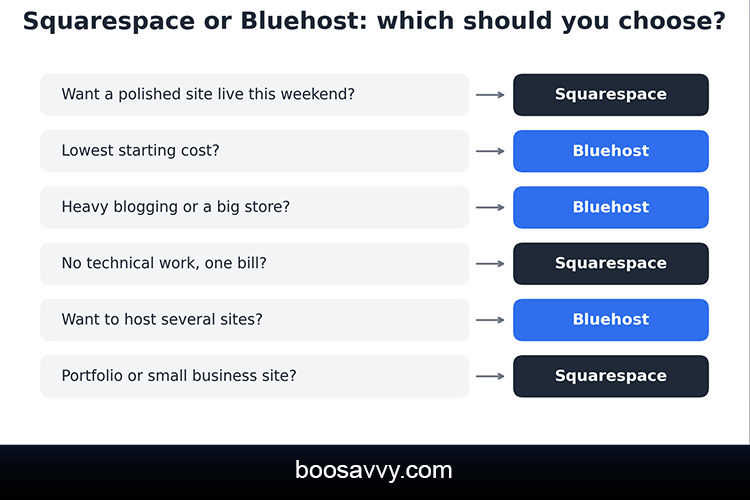
Choose Squarespace If You
- Want a stylish site live quickly with no technical work
- Run a portfolio, restaurant or small business site
- Prefer one predictable bill with everything included
Choose Bluehost If You
- Want the lowest starting cost and full control
- Plan to blog heavily, run a larger store or host several sites
- May want to move your site later
Conclusion
The Bluehost v Squarespace decision is really a convenience v control one. Squarespace is the smoother, more polished route with very predictable pricing and almost no maintenance at all. It’s more expensive and you’re locked into one platform. Bluehost with WordPress is cheaper to get going and is vastly more flexible, but the renewals and add-ons will quite quickly eat into your savings and there’s a very real learning curve.
If you want speed to market and design then Squarespace is the way to go. If you want ownership, the ability to grow and a lower monthly bill then Bluehost is the way to go. Whichever you choose, read the renewal terms, work out the three year cost and test the free trial or refund period before you commit.
FAQs
1. Is Bluehost better than Squarespace?
Neither is better overall. Bluehost offers more control and a lower starting price, while Squarespace is easier and more polished.
2. Is Squarespace or Bluehost cheaper?
Bluehost is cheaper on paper, with plans from about $3.99 a month, but renewals and add-ons raise the total. Squarespace costs more per month but includes more.
3. Does Bluehost have a website builder?
Yes. Bluehost offers WonderSuite, a WordPress-based builder with AI tools, though it isn’t a standalone platform like Squarespace.
4. What is the difference between a website builder and web hosting?
A website builder bundles design tools and hosting, while web hosting provides only server space for software like WordPress.
5. Which is easier for beginners?
Squarespace is generally easier because it includes everything. Bluehost takes more time to learn.
6. Can I host multiple websites on Bluehost?
Yes, on higher-tier plans. Squarespace requires a separate subscription for each site.
7. Does Squarespace raise prices at renewal?
Squarespace doesn’t list a separate renewal rate, but it has raised plan prices; one report cited increases of up to 26% in July 2026.
8. Which is better for SEO?
Both cover the basics. WordPress on Bluehost offers more advanced control through plugins, while Squarespace keeps SEO simple.
9. Can I move my site from Squarespace to Bluehost?
Yes, but Squarespace’s exports are limited, so you may need to rebuild some pages or use migration help.
10. Which is better for online stores?
Squarespace is simpler for small stores. WordPress with WooCommerce on Bluehost suits larger or more customized stores.