
Choosing between two budget hosts seems like such an easy decision until the bill actually comes in. Most of the overspending on hosting is down to a very small number of avoidable mistakes: looking at the introductory price, not looking at the renewal price, saying yes to every single checkout upsell, and blindly trusting the old reviews. This Bluehost vs A2 Hosting guide looks at the mistakes that people make most often when choosing a host, with actual figures so you can make the right choice and end up with more of your own money.
Also Read: Bluehost vs WP Engine: Which One Delivers Better Performance and Value?
Bluehost vs A2 Hosting at a Glance
A2 Hosting Is Now Hosting.com
A2 Hosting has been rebranded as Hosting.com as a result of the acquisition by World Host Group. Many reviews and search results still use the old name, and the old plan names (e.g., Turbo) have been replaced with the new plan names. This guide uses ‘A2 Hosting’ where the brand people are still searching for and ‘Hosting.com’ where we’re talking about the current plans.
Who Each Host Suits
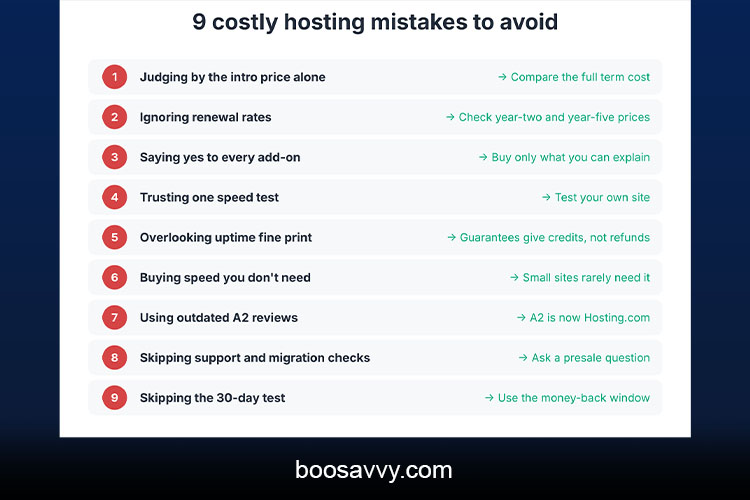
Bluehost is aimed at the beginner, the WordPress user who just wants a simple setup, and it’s the official WordPress.org recommendation. A2 Hosting is aimed at speed-oriented users and developers, with LiteSpeed, NVMe storage, and SSH tooling. They’re rated very similarly by the review sites (one gives A2 Hosting 4.3/5 and Bluehost 4.2/5).
Mistake 1: Choosing on the Intro Price Alone
Why Intro Prices Mislead
Both hosts advertise extremely low entry prices which only apply to your first term. Hosting.com’s entry plan is listed at around $1.99/month on a 4-year term; Bluehost’s Starter is around $3.99/month on a 3-year term (some reviews quote slightly different figures). Those figures tell you absolutely nothing about what you’ll be paying in year 5.
The Pricing Snapshot
| Intro price (entry) | About $3.99/mo (36-month term) | About $1.99/mo (48-month term) |
| Renewal price (entry) | About $9.99/mo | About $13.99/mo |
| Money-back window | 30 days | 30 days |
| Free domain, year one | Yes | Yes |
| Control panel | Custom dashboard plus cPanel | cPanel |
Prices will vary by term and by source. Some of the reviews list Bluehost renewal at around $10.99 to $11.99 and A2 at around $12.99, so check the current rates at checkout.
Mistake 2: Ignoring Renewal Rates
The Renewal Gap
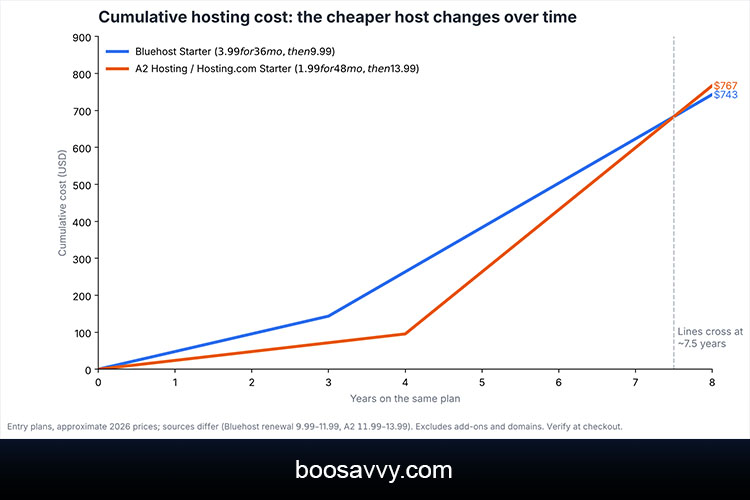
Both hosts go full-on price hike once the promotional period is over. Bluehost’s entry-level plan is up by roughly 2.5x on the intro rate, and Hosting.com’s is up by around 7x (from $1.99 to $13.99). As a result, the cheaper host on day one isn’t necessarily the cheaper host over the longer term.
When does each become cheaper?
Using the figures above, Hosting.com is cheaper for roughly 7.5 years (the long 4-year promo gives it a massive head start). After that, Bluehost’s lower renewal rate takes over. If you’re going to stay on the same site with the same host for 10 years, Bluehost can end up being the cheaper option. If you’re going to be moving or rebuilding every few years, then the cheap first term of Hosting.com is obviously the thing that matters. The error is in assuming one or other is going to be cheaper without doing the maths.
Mistake 3: Saying Yes to Every Checkout Add-On
Bluehost’s Upsells
Bluehost’s checkout page is full of extras to promote (backups, malware scanning, domain privacy, premium SSL). One source has an estimate that if you took all of them, these could add $5-$10 a month. Some of them are useful; many of them are just features you can get for free elsewhere.
Extras on the A2 Hosting Side
Hosting.com also offers add-ons, and some of the features are only available on higher plans (e.g. CDN on shared plans, longer backup retention). You need to read the feature list for each plan very carefully, as you can’t just assume that a basic plan will have them.
A Simple Rule
Buy nothing at checkout that you can’t explain in one sentence. You can always add the backups and the security later on when you actually need them.
Mistake 4: Trusting Speed Claims Without Context
What Tests Show
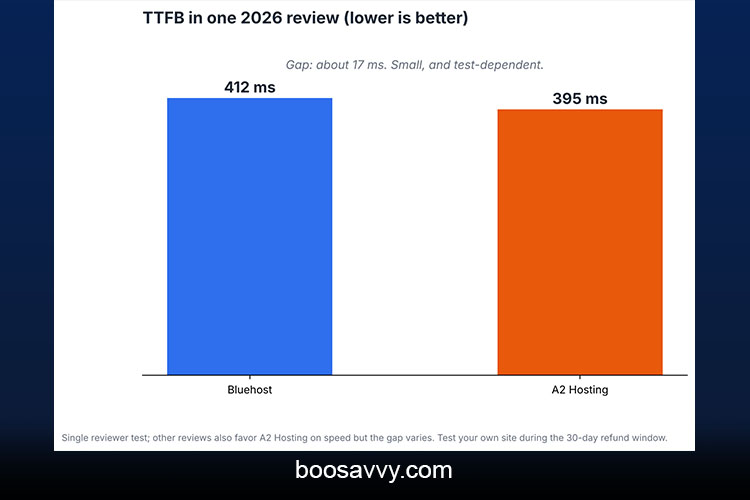
Most of the independent comparisons go for A2 Hosting on speed (thanks to LiteSpeed and NVMe on the performance plans). One 2026 review saw A2 Hosting at 395ms time to first byte compared to Bluehost at 412ms (a difference of just about 17ms). Another review came to the conclusion that A2 Hosting wins on speed, although the difference is only going to be significant for sites where performance is absolutely critical. Be aware that many of the comparison sites will be earning affiliate commissions, so take any single figure as being just that: a direction.
| TTFB (one 2026 review) | 412 ms | 395 ms |
| Uptime guarantee | 99.9% | 99.9% |
| Typical real-world uptime (one review) | Strong, edges ahead in one test | 99.95–99.99% |
| Best suited to | Beginners, WordPress | Speed-focused, developers |
Mistake 5: Overlooking Uptime and Guarantees
Both providers boast a 99.9% uptime guarantee (which is effectively nine hours of downtime per year). In reality, the figures are better, with one review citing A2’s actual uptime at 99.95% to 99.99%, and another six-month test suggesting Bluehost actually came out on top in terms of uptime. So in practice it’s pretty much the same. Uptime is therefore not a huge differentiator, so you probably won’t need to pay extra for it unless a minute of downtime is going to cost you real money. Do check the fine print, as the guarantee is typically just credits rather than a refund and one source notes that Bluehost’s guarantee may not apply to all of their WordPress plans.
Mistake 6: Buying More Speed Than You Need
A2’s performance plans are more expensive, and the speed difference is rarely going to be all that important for a blog, portfolio or small business site with fairly modest traffic. One review put it quite simply: A2 wins on raw speed, but for most small sites Bluehost’s speed is more than adequate. Only spend the extra if you’re running a store, a high-traffic publication or a developer site where you need fast response times and server control.
Mistake 7: Relying on Outdated A2 Hosting Reviews
Why Old Reviews Mislead
Given the rebrand to Hosting.com, an older review may well refer to plan names, prices and limits that don’t exist any more. One comparison page even explicitly states that the old A2 renewal pricing was frequently viewed as quite high. Always check the date of publication and verify the details on the current pricing page.
How to Check Quickly
Open the provider’s pricing page, note the plan names and the renewal prices and cross-check that against what the review says. If they don’t match, then the review is out of date.
Mistake 8: Skipping Support and Migration Checks
Support
Bluehost have 24/7 chat and phone support. Hosting.com have 24/7 chat, tickets and phone support as well (although older reviews rated A2’s support as good, not the very best). Do the live chat with a pre-sale question before you buy, as the quality of the response is very telling.
Migration
Both hosts offer free site migration, the difference being in the speed of the process and how it’s done. If you’re moving an existing site, then you need to ask how long it takes and whether it’s done by a member of staff or via a plugin.
Mistake 9: Skipping the Money-Back Test
Both hosts have a 30-day money-back guarantee and a lot of people never exercise it. Treat the first 30 days as a trial:
- Install your real theme and plugins
- Run a speed test from your target location
- Contact support with a genuine question
- Check backups and email setup
- Review the renewal date and price before the window closes
A short test, of course sidesteps the three or four year commitment to the wrong host.
Which host fits which site?
Choose Bluehost If You
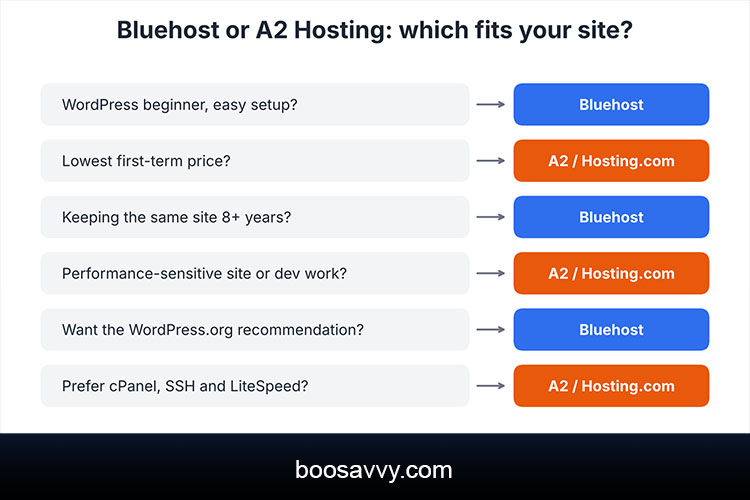
- Are a WordPress beginner who wants an easy setup
- Value the WordPress.org recommendation
- Plan to keep the same site for many years
Choose A2 Hosting (Hosting.com) If You
- Want the lowest first-term price
- Run a performance-sensitive site or work as a developer
- Prefer cPanel, SSH and LiteSpeed-based tooling
Conclusion
The most expensive bit of the Bluehost vs A2 Hosting decision is almost never the monthly price. It’s the errors you make around it: chasing the intro rate, ignoring the renewal rate, accepting the upsells and believing the old reviews. Hosting.com (the A2 Hosting successor) is cheaper up front and tends to be a bit faster in the majority of the tests; Bluehost is more geared towards the beginner and is cheaper at renewal.
Look at the total cost over the length of time you’re actually going to keep it, check the renewal terms before you go to checkout, use the 30-day window to test your own site and only buy the add-ons that you actually need. A bit of homework at this stage is the cheapest hosting decision you’re ever going to make.
FAQs
1. Is Bluehost better than A2 Hosting?
Bluehost is better for beginners and WordPress users, while A2 Hosting (now Hosting.com) is usually faster and cheaper at first. The better choice depends on your site.
2. Is A2 Hosting the same as Hosting.com?
Yes. A2 Hosting was rebranded as Hosting.com after its acquisition by World Host Group.
3. Which is cheaper, Bluehost or A2 Hosting?
A2 Hosting is cheaper in the first term. Bluehost’s renewal is lower, so it can become cheaper after roughly seven years on the figures used here.
4. Which is faster, Bluehost or A2 Hosting?
Most independent tests favor A2 Hosting, though the gap is small and varies by test and plan.
5. What are the most costly hosting mistakes?
Choosing on intro price alone, ignoring renewal rates, buying every checkout add-on, and committing to a long term without testing.
6. Do Bluehost and A2 Hosting have a money-back guarantee?
Both offer a 30-day money-back guarantee on shared hosting, according to current comparisons. Confirm on each site.
7. Do both include a free domain?
Both commonly include a free domain for the first year, which then renews at the normal price.
8. Which has better support?
Both offer 24/7 chat and phone support. Test live chat before buying to judge quality yourself.
9. Can I migrate my site to either host for free?
Both offer free migration, though the process and speed differ, so ask before you buy.
10. Which is better for WordPress?
Both support WordPress well. Bluehost is officially recommended by WordPress.org and is simpler for beginners, while A2 Hosting offers LiteSpeed-based speed tooling.