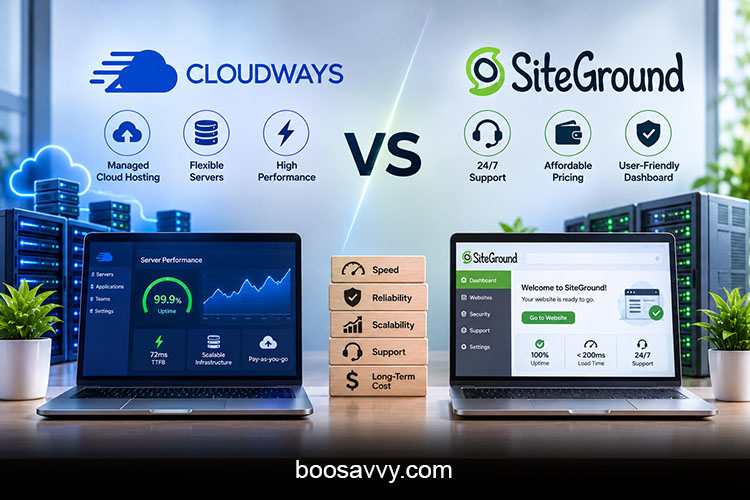
Most people think the Cloudways vs SiteGround debate is just a simple cost one: SiteGround is the cheap one, Cloudways is the expensive one, that’s it. The truth is rather more interesting. They’re built on completely different platforms, bill you in completely different ways, and support you through completely different channels. Some of the differences will be surprising (for instance, the 3-year cost gap is actually a lot smaller than the face value of the prices would suggest). This guide goes through all the differences so you can pick the right host.
Also Read: A2 Hosting vs Hostinger: Hidden Costs and Downsides to Know First
Cloudways vs SiteGround at a Glance
Two Different Kinds of Hosting
SiteGround are a shared hosting provider with a very strong WordPress focus and run on Google Cloud. Cloudways is a managed cloud platform. You lease a virtual server from a provider such as DigitalOcean, Vultr, Akamai Cloud, AWS, or Google Cloud, while Cloudways takes care of managing the server infrastructure for you.
Who Each Host Targets
SiteGround targetsd at bloggers, small businesses and the kind of person who wants a simple dashboard and human support. Cloudways targets growing sites, WooCommerce stores, developers, and agencies that want dedicated resources but don’t want to run a server themselves. The review sites reflect that split, with one listing SiteGround as the best choice for the performance-focused WordPress user and Cloudways as the choice for developers and agencies.
Cloudways or SiteGround? The Core Architecture Difference
SiteGround: Shared Resources, Managed Experience
On a SiteGround plan, your site will be sharing the server resources with the other sites on that server (within defined limits). That keeps costs down and setup straightforward, and sites with mostly static content will perform very well thanks to the various caching tools (e.g., SuperCacher). The downside is that sites which are very dynamic can easily hit the plan limits.
Cloudways: Dedicated Cloud Servers
With Cloudways, you rent an isolated virtual server and can run multiple apps on it. You don’t share resources with other customers, which is why Cloudways generally handles traffic spikes much better. The downside is that you have to pick and size the server yourself.
Managed Cloud Hosting Comparison: Features
Server and Provider Choice
This is a real shock to a lot of people. With Cloudways, you pick the cloud provider, server size, and data centre location. SiteGround makes those decisions for you (which is obviously easier, less flexible and of course doesn’t give you the option of cloud plans if your site grows beyond shared hosting).
Caching, Staging and Developer Tools
Cloudways has staging, Git, a free WordPress migration plugin and its Breeze caching plugin as standard, with optional add-ons available such as Cloudflare Enterprise. SiteGround includes staging, Git, and cCache reserves caching too, though staging and besions are only available on their higher plans. Both are very WordPress centric and SiteGround does include email (Cloudways doesn’t).
Pricing: The First Surprise
The Sticker Price vs the Real Price
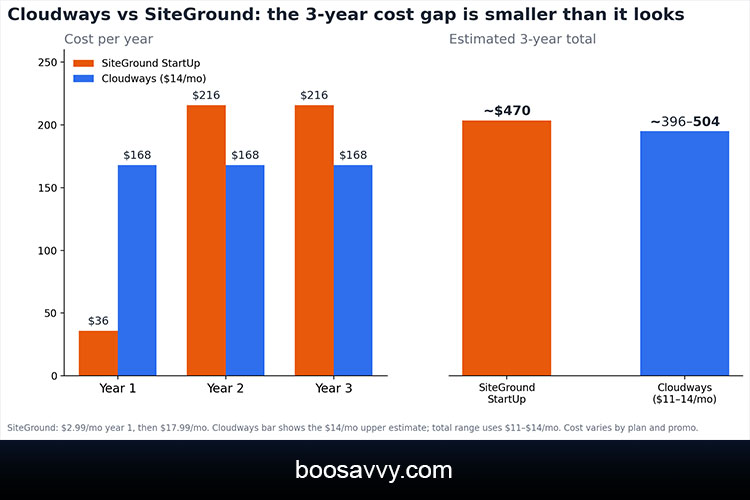
SiteGround are advertising their StartUp plan at $2.99 a month; Cloudways start at around $11-$14 a month. That’s a massive difference on paper. One review points out that Cloudways’ advertised price is based on the smallest DigitalOcean server, so if you need more power your actual bill could be considerably higher.
Three Years Later, the Gap Shrinks
SiteGround’s low price is only for the first term, after which StartUp renews at around $17.99/month. Over 36 months, that’s roughly $470 (a year at $2.99 and two years at $17.99). A $11-$14 Cloudways plan would come in at roughly $396-$504 over the same period, so they’re pretty much even.
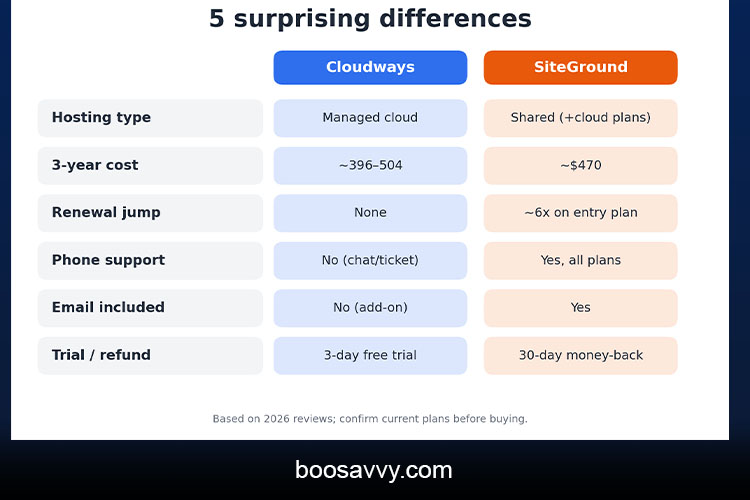
| Advertised price | About $2.99/mo (intro) | About $11–$14/mo |
| Renewal | About $17.99/mo | Same (no renewal jump) |
| Billing | Fixed term (1–3 years) | Pay-as-you-go, hourly or monthly |
| Approx. 3-year cost | About $470 | About $396–$504 |
| Free trial / refund | 30-day money-back | 3-day free trial |
Prices will vary by plan, term and promotion so please check current rates at checkout.
Hidden Costs on Both Sides
SiteGround’s Renewal Shock
SiteGround’s highest hidden cost is the renewal. The entry plan renews at around six times the introductory rate, and the higher plans go up to $29.99 and $44.99 a month. One reviewer actually puts the jump from the original $1.99 at nine times. Plan around the renewal not the first invoice.
Cloudways’ Add-Ons
Cloudways has no renewal jump, though the extras do add up. The reviewers note the availability of optional paid add-ons (CDN, email, and extended backups) and point out that email isn’t included in the base plan. You need to budget for these before you get to the final total.
Speed and Performance
Time to First Byte (TTFB)
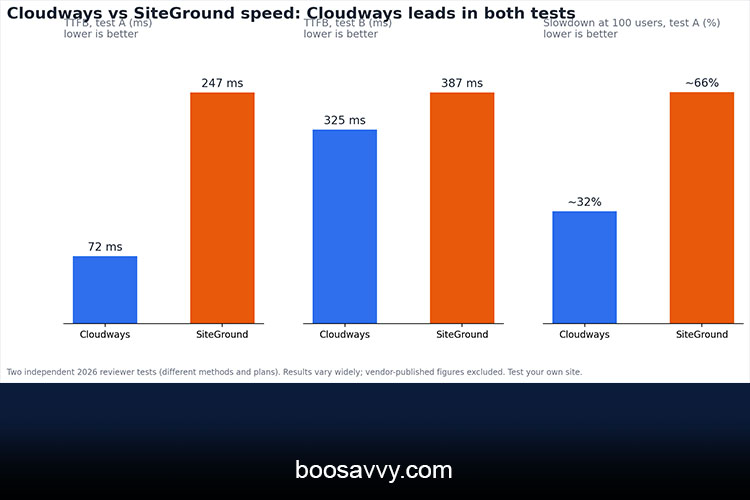
The vast majority of independent tests place Cloudways ahead on raw server response time. One 2026 test recorded a 72ms TTFB for Cloudways versus 247ms for SiteGround. Another test recorded 325ms for Cloudways compared to 387ms for SiteGround. The difference varies quite considerably from test to test, but the trend is pretty clear that Cloudways is faster (though both are in the acceptable range).
Performance Under Load
The benchmark with the largest gap also ran 100 concurrent users and saw Cloudways at a slowdown of around 32%, SiteGround at around 66% and some errors on the shared plan at higher loads. Again, these are the results of one reviewer (affiliate run tests can vary). Cloudways’ own marketing suggests a much bigger speed advantage but as ever you should check the vendor’s figures for yourself.
| TTFB, test A | 72 ms | 247 ms |
| TTFB, test B | 325 ms | 387 ms |
| Slowdown at 100 users (test A) | About 32% | About 66% |
| Reported uptime | 99.98–99.99% | 99.99% |
Uptime and Reliability
Uptime is pretty much a dead heat. The roundups have both hosts at around 99.98% to 99.99% (i.e. just a few minutes of downtime per month). Cloudways gets its redundancy from the cloud provider you pick; SiteGround gets it from Google Cloud. Neither really has an advantage so uptime shouldn’t be the deciding factor here.
Scalability: Where Cloudways Pulls Ahead
Scaling Cloudways Servers
Cloudways’ biggest practical advantage is that you can resize a server in a few clicks. You can start small and scale up as your traffic increases, and you’re only paying for what you use. As it bills on an hourly or monthly basis, you can also test out a larger server without having to commit to it for a long period of time.
Scaling on SiteGround
SiteGround scales by moving you up to a higher plan or onto one of their cloud plans. That works fine if you’re growing steadily, but planned upgrades are far less flexible than resizing a cloud server on demand. A lot of sites that are growing will end up moving from SiteGround to Cloudways once they’ve outgrown the shared hosting limits.
Ease of Use: The Learning Curve
SiteGround’s Beginner-Friendly Dashboard
SiteGround’s Site Tools dashboard is clean, and the various tasks you can do via it (installing WordPress, adding caching, setting up email, etc.) all feel pretty straightforward. It’s the easier host if you’re just getting started with a website.
Cloudways’ Server-Level Control
Cloudways’ platform is pretty user-friendly for a cloud product, and it exposes you to server-level stuff (server size, cloud provider, app settings, etc.). The guides are good for the beginner. If you just want to get a blog online then SiteGround is going to be quicker to learn.
Customer Support: Another Surprise
SiteGround Offers Human Support on Every Plan
SiteGround have 24/7 chat, phone and ticket support and reviewers time and again highlight their WordPress-knowledgeable agents as a real plus if you want to actually talk to someone. SiteGround is the clear winner in that respect.
Cloudways Leans on Chat and Tickets
Cloudways has 24/7 chat and ticket support (no phone line according to a number of reviewers). The trial is also shorter at three days free (as opposed to SiteGround’s 30-day money-back period), so testing it quickly is even more important.
Security and Backups
Both hosts offer free SSL certs, firewalls and automated backups. Cloudways goes a step further with a dedicated firewall and 2FA at the platform level. SiteGround includes its own anti-bot protection and a security plugin. In either case, you should have an offsite backup of your own, as the host’s backup is a safety net, not a substitute.
Who Should Choose Which?
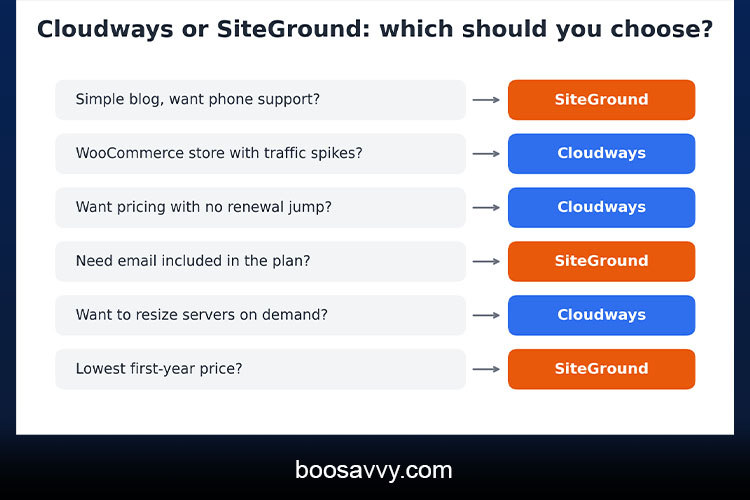
Choose SiteGround If You
- Want the lowest first-year price and a simple dashboard
- Value phone support and included email
- Run a blog or small business site with moderate traffic
Choose Cloudways If You
- Run a WooCommerce store or a site with traffic spikes
- Want to choose your cloud provider and resize servers on demand
- Prefer steady pricing without a renewal jump
Conclusion
The biggest surprise in the Cloudways vs SiteGround comparison is that the cheaper host isn’t necessarily the cheaper host when you get to the renewal point and the more expensive host isn’t necessarily the more difficult to use. SiteGround wins on ease of use for the beginner, on human support and on email. Cloudways wins on speed, on scalability and on the fact that the pricing doesn’t change. If you’re running a site and want human support on the phone, SiteGround is the one to go for and plan for renewal. If you’re running a store, if you’re expecting growth or if you want control over your server then Cloudways is the one for you. Whichever way you go, compare the three year costs, test your own site during the trial or refund period and come back to the decision if your traffic ends up outgrowing it. refund window, and revisit the choice if your traffic outgrows it.
FAQs
1. Is Cloudways better than SiteGround?
Cloudways is generally faster and more scalable, while SiteGround is easier for beginners and offers phone support. The better choice depends on your site and skills.
2. Which is cheaper, Cloudways or SiteGround?
SiteGround is cheaper in year one, but its renewal rates narrow the gap. Over three years, the totals can be close.
3. Cloudways or SiteGround: which is faster?
Most 2026 tests show Cloudways with a lower server response time, though results vary by test and plan.
4. Is Cloudways good for beginners?
It can be, with its guides and managed setup, but SiteGround has a gentler learning curve.
5. Does Cloudways have phone support?
Reviewers note 24/7 live chat and ticket support, but no phone assistance, whereas SiteGround provides phone support.
6. Does Cloudways include email hosting?
No. Email is an optional paid add-on, while SiteGround includes email on its plans.
7. Is there a free trial or refund?
Cloudways offers a 3-day free trial, and SiteGround offers a 30-day money-back guarantee.
8. Which is better for WooCommerce?
Cloudways is often preferred for dynamic stores because of its dedicated resources and easy scaling, though SiteGround works for smaller shops.
9. Can I migrate from SiteGround to Cloudways?
Yes. Cloudways offers a free WordPress migration plugin and migration service, and it is a common upgrade path.
10. What is a managed cloud hosting comparison?
It compares hosts that run your site on cloud servers while handling setup, security and updates for you, such as Cloudways, against traditional shared hosts such as SiteGround.