
Have you ever typed in a slightly different version of a company’s web address and still wound up on the right site? It’s very likely that you were using an alias domain. For site owners an alias is one of the simplest ways of protecting your brand, catching typos and making use of up all those extra domain names without the need to create any additional websites. So what is an alias domain, how does it work and when should you use one? This guide is going to answer all three of those questions in plain English.
Also Read: What Is NVMe Storage? Why Switching to It Will Supercharge Your PC’s Speed
What Is an Alias Domain?
A Simple Definition
An alias domain is an additional domain name that points to the same website / hosting account as your main domain. If you go to either one you’ll see the same site. So if example.com is your main domain and example.net is an alias then both will display the same site.
Other Names You Might See
Hosts have different names for the same thing. In cPanel it’s an alias, in some of the older versions it was a parked domain. Some hosts will call it a ‘domain pointer’ or a ‘mirror domain’. The terminology is different but the concept is the same: one site, multiple names.
How an Alias Domain Works
The Basic Flow
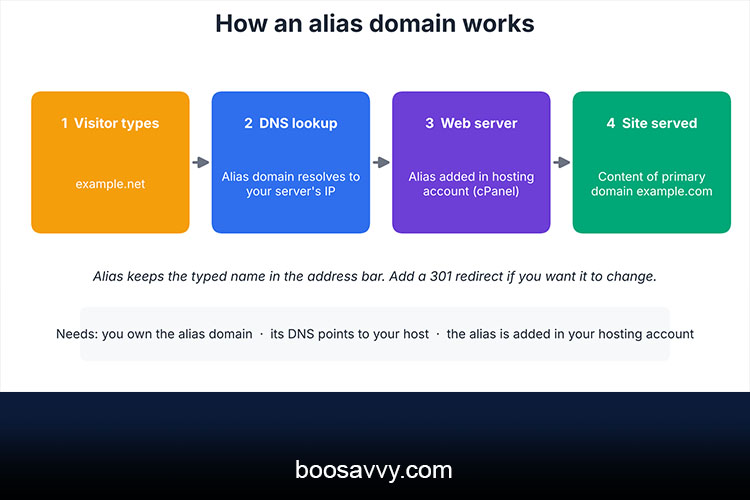
If you type your alias domain into a browser the DNS will resolve that to the IP address of your hosting server. Your web server will then see which domain has been requested and will serve up the content of your primary domain. By default your alias will be a mirror of your primary domain and the alias name will be visible in the address bar.
What You Need to Make It Work
Three things need to be in place: you must own the alias domain, the DNS for that domain must be pointing to your hosting server (either via nameservers or an A record) and your hosting account must have the alias added. If any one of those is missing then the visitor will either see an error or a parked page rather than your site.
Alias Domain vs Redirect
Alias: The Address Stays
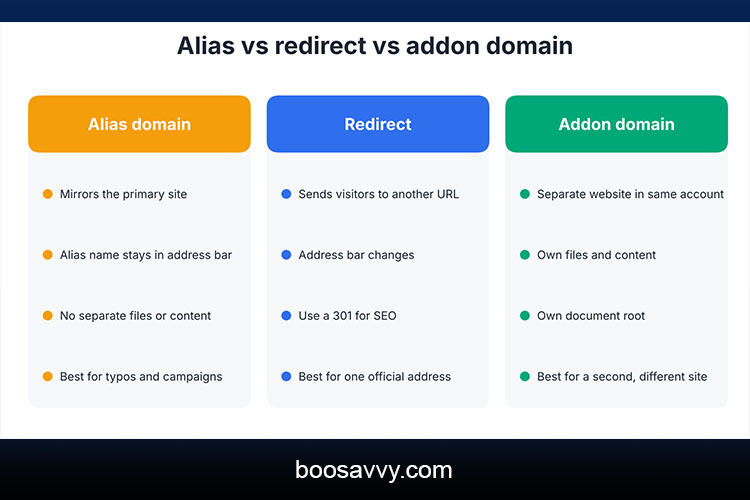
With an alias the visitor will just keep seeing the alias name in their browser as they’re looking at the content of your primary site. There’s no redirect at all. The server is just answering to more than one name.
Redirect: The Address Changes
A redirect will take the user to a different URL and the address bar will then show the primary domain. cPanel’s own community advice is that you don’t need a redirect at all in the case of an alias, but many site owners will still go ahead and add a redirect in that situation so that the alias doesn’t show up in the address bar.
Which Should You Use?
Use a plain alias if all you want is for the extra name to look like its own address (i.e. for a campaign). Use an alias plus a redirect if your intention is to funnel everybody through one official address which is generally the better option for most businesses.
Alias Domain vs Addon Domain vs Primary Domain
It’s very easy to confuse these terms. See the table below.
| Primary domain | The main domain of the hosting account | Yes | Your main site |
| Alias (parked) domain | Mirrors the primary site under another name | No, shares the primary’s content | Typos, extra TLDs, campaigns |
| Addon domain | A separate site in the same account | Yes, own files and content | A second, different website |
| Redirect | Sends visitors to another URL | No | Consolidating to one address |
Alias Domain vs CNAME and ALIAS DNS Records
The Name Confusion
The word ‘alias’ comes up in DNS and in that context it has a very different meaning. A CNAME record makes one name an alias of another at the DNS level (a CNAME record can be used to make www an alias of your main domain). An ALIAS record is a provider specific feature which works in a similar way to a CNAME but can be used on the root domain.
Key Differences
| A record | Maps a name directly to an IPv4 address | Yes | Standard for hosting |
| CNAME | Points one name to another name | No | Can’t coexist with other records at the same name |
| ALIAS / ANAME | CNAME-like pointer, provider-specific | Yes | Behavior varies by DNS provider |
The practical rule is that a hosting alias domain will typically need your DNS to point to the server via an A record or the host’s nameservers. CNAME and ALIAS records are DNS records you can use as you go.
Benefits of Using an Alias Domain
Catch Typos and Variations
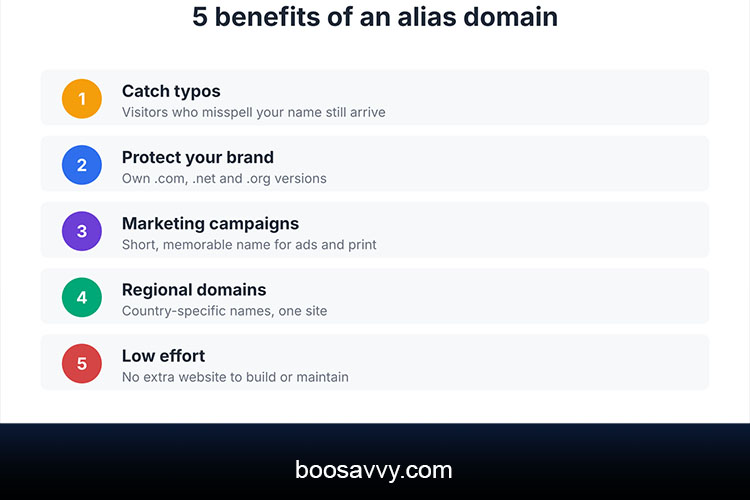
People will spell names wrong and guess at extensions. The trick is to register the common misspellings and point them at your site so that those people still end up at your site rather than your competitor’s or an error page.
Protect Your Brand
Owning your name under .com, .net and .org stops others from registering lookalike domains which could confuse customers and/or damage your reputation.
Run Marketing Campaigns
A short, memorable alias can be printed on a flyer, an ad or on packaging and still get people to your main site. That makes it far easier to track and to remember.
Serve Multiple Regions or Languages
Businesses will at various times register country specific domains and point them at the same site and then add in the redirects or the local pages at a later stage.
Low Effort and Often Free to Add
The vast majority of hosts will let you add loads of aliases without the need to create a new site at all and some will even go so far as to advertise unlimited aliases on every plan. Your only real outlay is the domain registration.
Alias Domains and Email
Mailboxes on an Alias
In cPanel you can create email accounts on an alias domain (they work as normal mailboxes rather than as mirrors of your main mailbox). The reviewers also point out that aliases are really for websites rather than email aliasing.
Email Forwarders
If you want the messages sent to info@example.net to end up in your main inbox then an email forwarder is the standard way to do it. Need to plan this early as multiple domains can also create some confusion about which one is the ‘official’ one and can lead to delivery issues if not properly managed.
SEO Considerations
The Duplicate Content Risk
An alias contains exactly the same content under multiple URLs. The search engines will see that as duplicate content and will split the ranking signals between those pages. That’s the primary downside of having an alias live without a redirect.
Best Practice
If search rankings are important, then you need to have a permanent (301) redirect from the alias to your main domain, or use canonical tags so that the search engines know which one is the correct one. You’d only want to keep a standalone alias in circumstances where you’re deliberately duplicating and you’re managing that.
Common Use Cases
Small Businesses
A local business can own its name plus its city (e.g. nameplumbing.com and nameplumbing.net) and send both to one site.
Agencies and Freelancers
Agencies will frequently use an alias or temporary domain to preview the client’s site before the actual domain is switched over.
Rebrands and Campaigns
When a company rebrands and change their name it’s entirely possible to keep the old domain name as an alias with a redirect in place. That way you maintain the existing links and you maintain the existing visitor behaviour.
How to Set Up an Alias Domain in cPanel
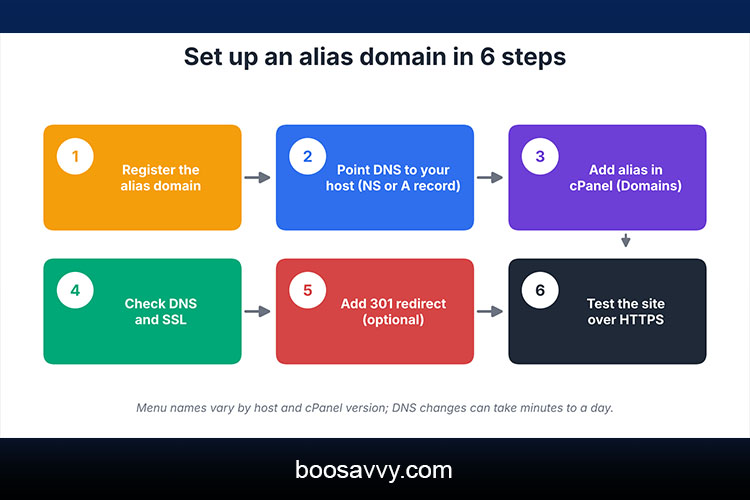
The exact menus will of course vary from host to host and from cPanel version to cPanel version, but the process is pretty much the same wherever you look.
Step 1: Register the Alias Domain
Buy the extra domain from any registrar really. Just ensure you can edit its DNS or nameservers.
Step 2: Point the Domain to Your Host
Change the alias domain’s nameservers to your host’s or add an A record pointing to your hosting account’s IP address. A CNAME on its own won’t be sufficient for this.
Step 3: Add the Alias in cPanel
Open the Domains or Aliases section (the name will vary depending on the version), enter in the alias domain and select your primary domain as the target. Some hosts will refer to this as adding a parked domain.
Step 4: Check DNS and SSL
cPanel will normally go and add the DNS records for the alias (including the www subdomain). Be sure the alias is covered by an SSL certificate so that people don’t get security warnings. Most hosts will issue you a free cert automatically.
Step 5: Add a Redirect (Optional)
If you want people (and search engines) to end up on one URL, then create a 301 redirect from the alias to the main domain.
Step 6: Test
Visit the alias (both with and without www) on desktop and on mobile and confirm that it’s loading up your site over HTTPS. Allow for the DNS changes to propagate (that can take anywhere from minutes to a full day).
Troubleshooting and Common Mistakes
The Alias Shows an Error or Parked Page
The usual offender is DNS that hasn’t been pointed at your server yet, or an alias that hasn’t been added to the hosting account. Check both of those.
The Wrong Record Type
Using a CNAME where an A record or nameserver change is required is a very common mistake as the alias has to point to your server’s IP address.
Certificate Warnings
If the browser is issuing a security warning then the SSL cert almost certainly doesn’t currently cover the alias. You’ll need to reissue it or add the domain to the cert.
Alias Domain Best Practices
- Choose a clear primary domain and treat aliases as supporting names
- Add 301 redirects when search rankings matter
- Register common misspellings and your name under key extensions
- Plan email forwarding before you launch
- Keep renewals on auto-renew so a lapsed alias isn’t hijacked
Conclusion
So what is an alias domain? It’s an additional domain name that points to the same site as your main domain, so people can get to the same site via more than one domain name. They’re very easy to set up, cheap to maintain and can be useful for catching typos, protecting your brand and running campaigns.
The caveats are that if you don’t manage them properly you can end up with duplicate content and email requires its own considerations. For most businesses the best approach is to have an alias in place and then a 301 redirect to one official domain. Check your host’s docs, set your DNS up correctly, test it and you’ll have a much stronger and more flexible web presence.
FAQs
1. What is alias domain in simple terms?
It is an extra domain name that points to the same website as your primary domain, so both names show the same content.
2. Is an alias domain the same as a parked domain?
In many hosting panels, yes. cPanel’s older term for an alias was a parked domain, though “parked” can also mean an unused domain showing a placeholder page.
3. What is the difference between an alias domain and a redirect?
An alias keeps the alias name in the address bar while showing your site’s content. A redirect sends visitors to the primary domain and changes the address.
4. Does an alias domain hurt SEO?
It can if left unmanaged, because identical content under two URLs may split ranking signals. A 301 redirect or canonical tags solve this.
5. What is the difference between an alias domain and an addon domain?
An alias mirrors the primary site, while an addon domain hosts a separate website with its own files in the same account.
6. Can I create email addresses on an alias domain?
Usually yes, but they work as regular mailboxes. For forwarding to your main inbox, use an email forwarder.
7. Is an alias domain the same as a CNAME or ALIAS DNS record?
No. Those are DNS record types that point one name to another. A hosting alias domain is a server-level feature, and it normally needs the domain’s DNS to point to your server.
8. How many alias domains can I have?
It depends on your host. Some plans advertise unlimited aliases, while others cap them.
9. How long does an alias domain take to work?
Once DNS points to your host and the alias is added, it can work within minutes, though propagation may take up to a day.
10. Do I need an SSL certificate for an alias domain?
Yes, to avoid browser warnings. Most hosts issue free certificates automatically once the alias is added and DNS is correct.